Mailchimp Review India (2026): Pricing, Features & Honest Verdict
AT A GLANCE
Mailchimp remains a practical email marketing option for Indian small businesses, but scaling Shopify stores may outgrow its ecommerce automation and revenue attribution depth.
Check Mailchimp pricing →Quick Summary
- Mailchimp is a general-purpose email marketing platform suited for small businesses, service providers, and early-stage stores.
- Pricing is shown in INR for Indian users, which is a practical advantage over tools that bill only in USD.
- The free plan allows up to 250 contacts and 500 email sends per month.
- Paid plans in the tested account started at ₹2,518/month for the Essentials tier.
- The automation builder is functional, but not as deep as Klaviyo for ecommerce-specific flows.
- Best for: small businesses, service providers, local brands, and early-stage stores that need a straightforward tool.
- Not ideal for: scaling Shopify stores that need advanced segmentation, purchase-behaviour triggers, or deep ecommerce automation.
Mailchimp at a Glance
| Category | Rating |
|---|---|
| Ease of Use | 9/10 |
| Automation | 7/10 |
| Ecommerce Features | 6/10 |
| Reporting | 8/10 |
| Pricing for India | 9/10 |
| Beginner Friendliness | 9/10 |
| Overall | 8/10 |
This is not a score for every type of business. It reflects how Mailchimp performed in this review context: Indian small businesses, service providers, local brands, and early-stage ecommerce sellers who need a simple email marketing tool.
Who This Review Is For
This review is for Indian small business owners, marketers, and early-stage ecommerce sellers evaluating Mailchimp as their email marketing platform.
If you are comparing Mailchimp against tools like Klaviyo, Brevo, or MailerLite, or simply trying to understand whether Mailchimp is still a sensible choice in 2026, this review covers what matters for your situation.
I tested Mailchimp using an active account. Screenshots in this review are from that account. Personal contact details have been blurred. Some features may appear differently depending on your plan.
What Is Mailchimp?
Mailchimp is one of the longest-standing email marketing platforms in the market. It started as a newsletter tool for small businesses and has since expanded to include automations, landing pages, SMS, forms, and basic website functionality.
Unlike Klaviyo, which is purpose-built for ecommerce, Mailchimp is a general-purpose platform. It serves a broad range of businesses: local shops, service providers, nonprofits, freelancers, content creators, and small ecommerce stores. That breadth is both its strength and its limitation.
For Indian users specifically, Mailchimp has one practical advantage that is easy to overlook: it shows pricing in INR.
Setup Experience
Mailchimp’s setup is one of the friendlier experiences in email marketing. The navigation is clean: Campaigns, Automations, SMS, Forms, Audience, Analytics, Website, Content, and Integrations. The home dashboard surfaces actionable data immediately.
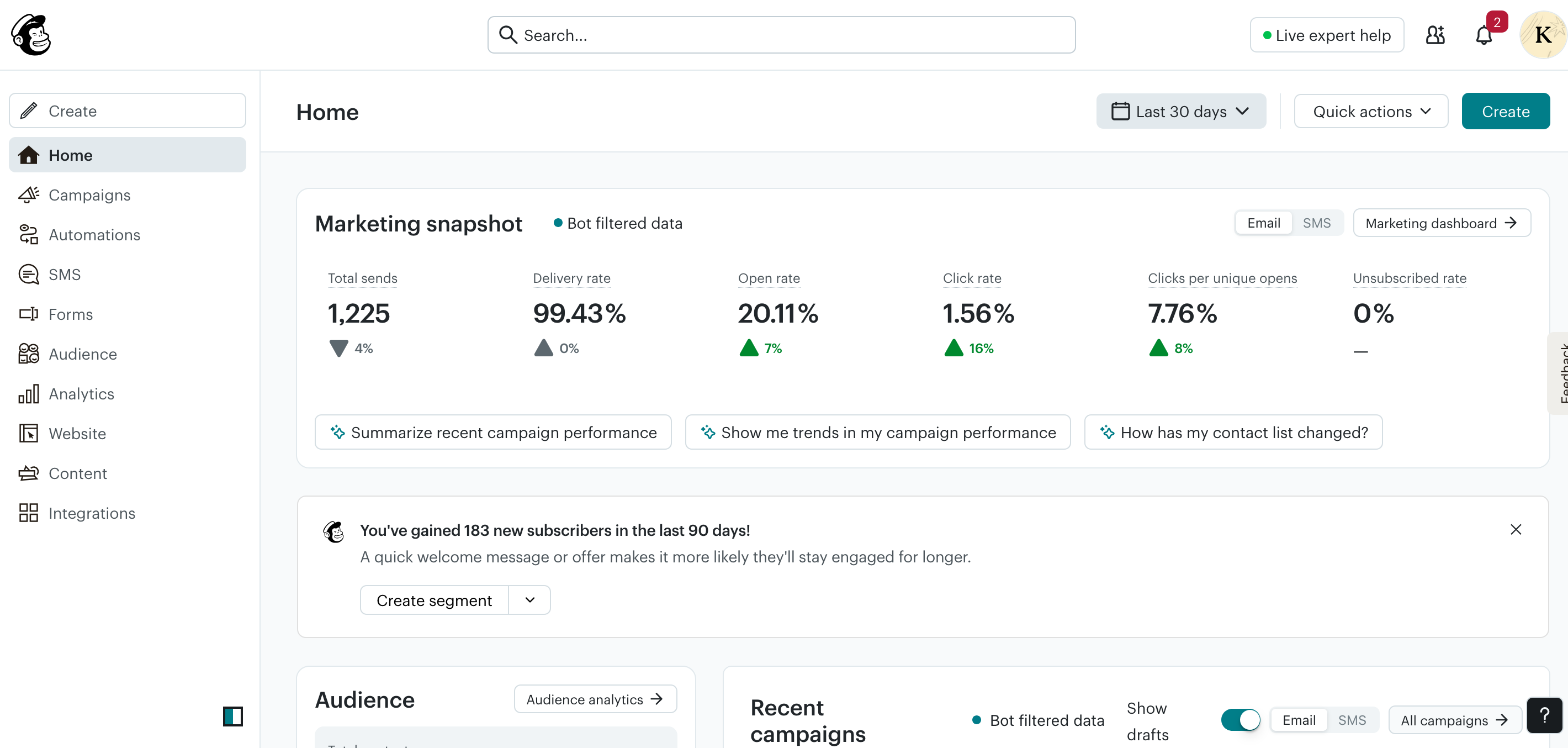
From the dashboard, the Marketing Snapshot shows key metrics at a glance: total sends, delivery rate, open rate, click rate, clicks per unique opens, and unsubscribed rate. The bot-filtered data label is a useful transparency signal because Mailchimp attempts to filter out bot-inflated open rates from the numbers you see.
A prompt on the dashboard noted 183 new subscribers gained in the last 90 days with a suggestion to create a welcome segment. That kind of contextual nudge is typical of Mailchimp’s guided approach. The platform tends to suggest the next logical action rather than leaving you to find it yourself.
For someone new to email marketing, this makes Mailchimp considerably less intimidating than platforms like Klaviyo or ActiveCampaign.
Audience and Contact Management
Mailchimp’s contact management is clear and practical for most use cases.
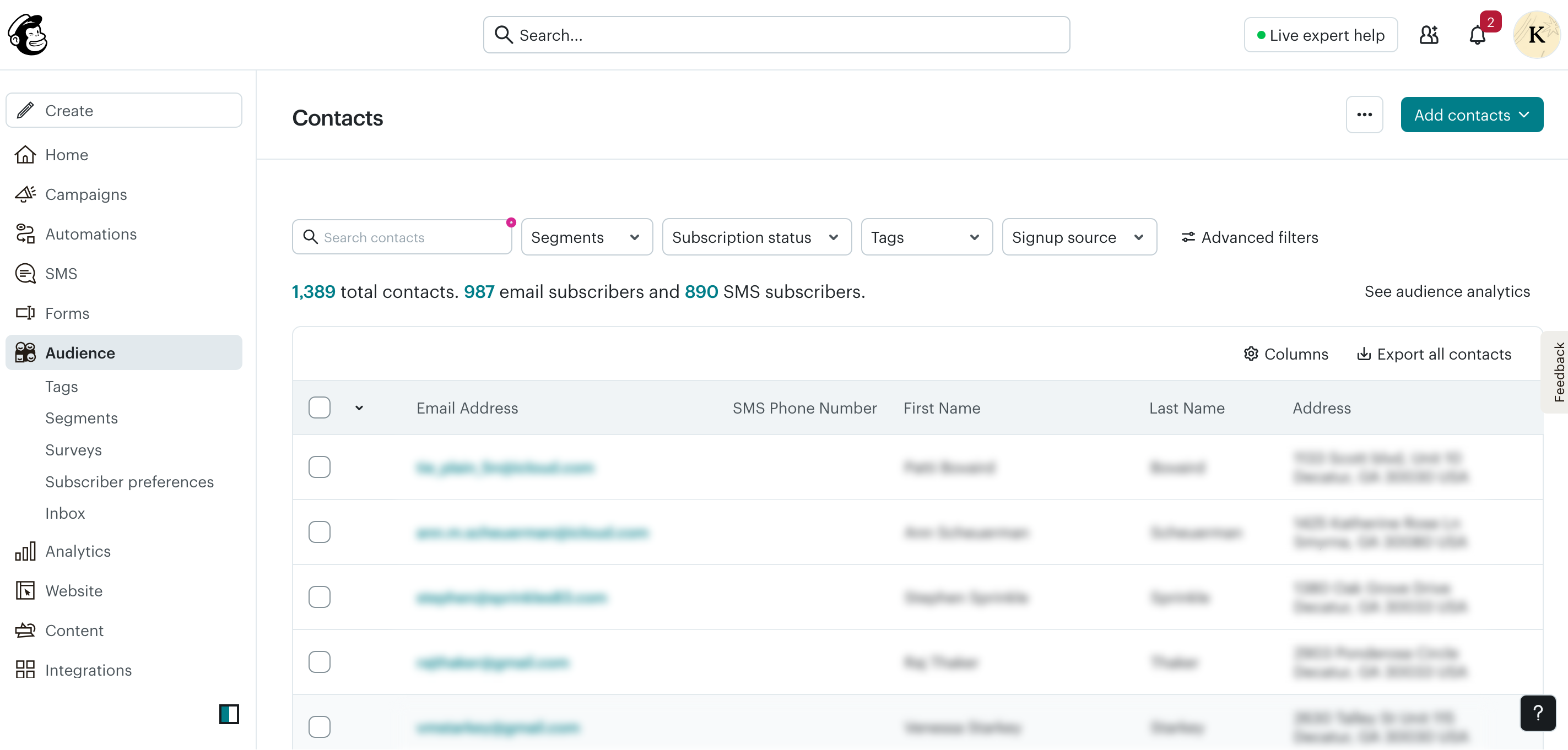
The Contacts screen shows the total audience across channels. In this account, that was 1,389 total contacts with 987 email subscribers and 890 SMS subscribers. You can filter contacts by segment, subscription status, tags, signup source, or advanced filter combinations.
The sub-sections under Audience include Tags, Segments, Surveys, Subscriber preferences, and Inbox, giving you a reasonable set of tools to organise and understand your list without needing to build complex logic from scratch.
One thing worth noting: Mailchimp’s segmentation is tag and condition-based rather than behaviour-based in the same way Klaviyo is. You can segment by signup source, subscription status, tags, and some engagement activity, but the depth of purchase-behaviour segmentation that Klaviyo offers from Shopify data is not replicated here without manual tagging or third-party integrations.
For a service business or a small store with a simple list structure, this is plenty. For a Shopify brand that wants to segment by number of orders, product purchased, or predicted LTV, it starts to show limitations. For a deeper ecommerce-focused alternative, see the Klaviyo Review India.
Email Builder
Mailchimp’s email editor is clean, beginner-friendly, and well-organised.
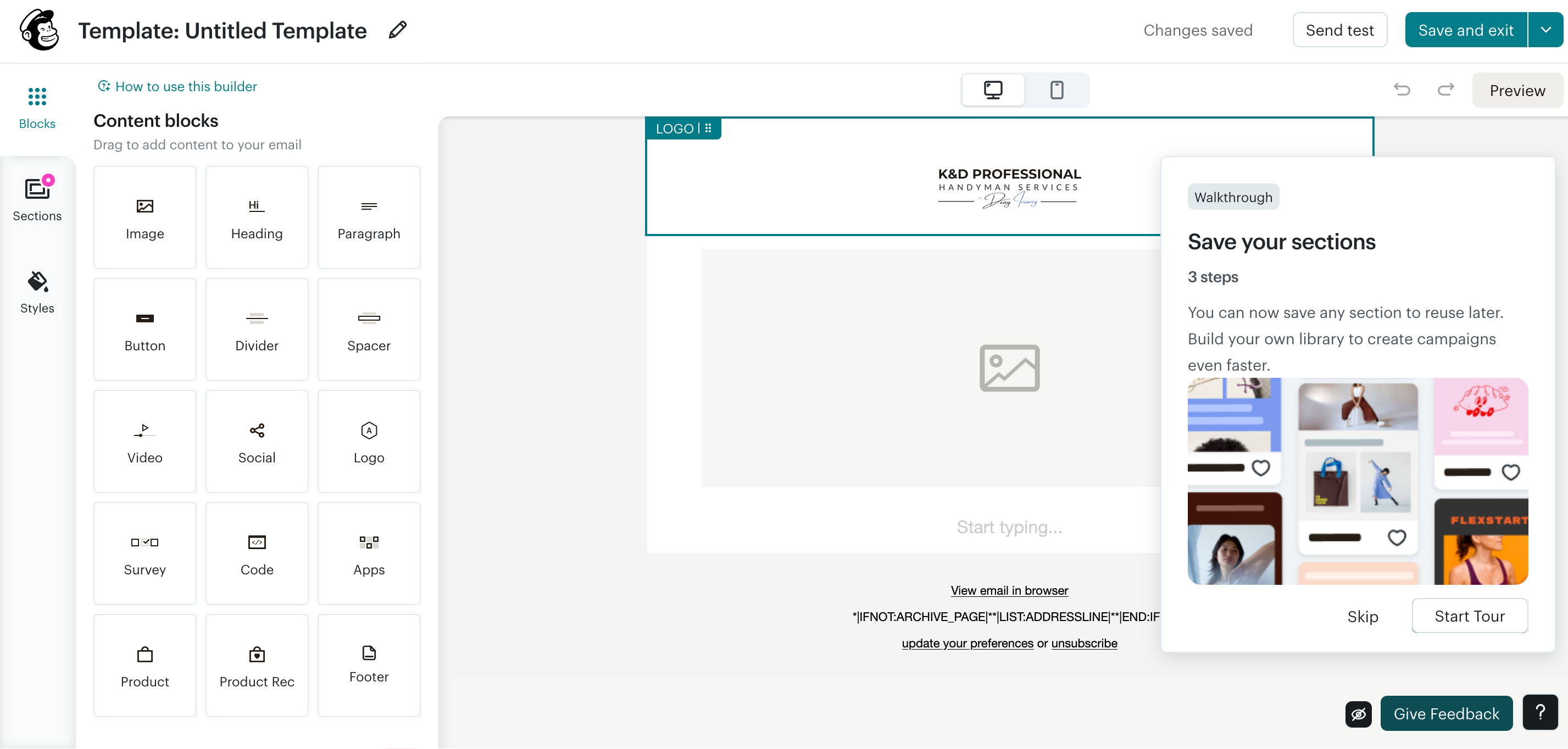
The content blocks panel includes a solid set of options: Image, Heading, Paragraph, Button, Divider, Spacer, Video, Social, Logo, Survey, Code, Apps, Product, Product Rec, and Footer. There is a Sections tab for reusable saved layouts and a Styles tab for global design settings.
The Product and Product Rec blocks indicate that Mailchimp has ecommerce content support built in. You can feature products in emails, but this works differently from Klaviyo’s live product sync. The depth of dynamic product content depends on how well your store is connected.
The Survey block stands out because you can embed a survey directly into an email. That is useful for collecting feedback from subscribers without sending them to a separate page.
The editor autosaves continuously, and the desktop/mobile toggle lets you preview how your email renders on different devices. There is also a guided walkthrough built into the builder for new users, plus a Send test button to preview in an actual inbox before sending.
Compared to Klaviyo’s editor, Mailchimp’s is slightly more straightforward, but it trades some ecommerce-specific depth for simplicity.
Campaigns
Mailchimp’s campaign management is one of its more polished features.
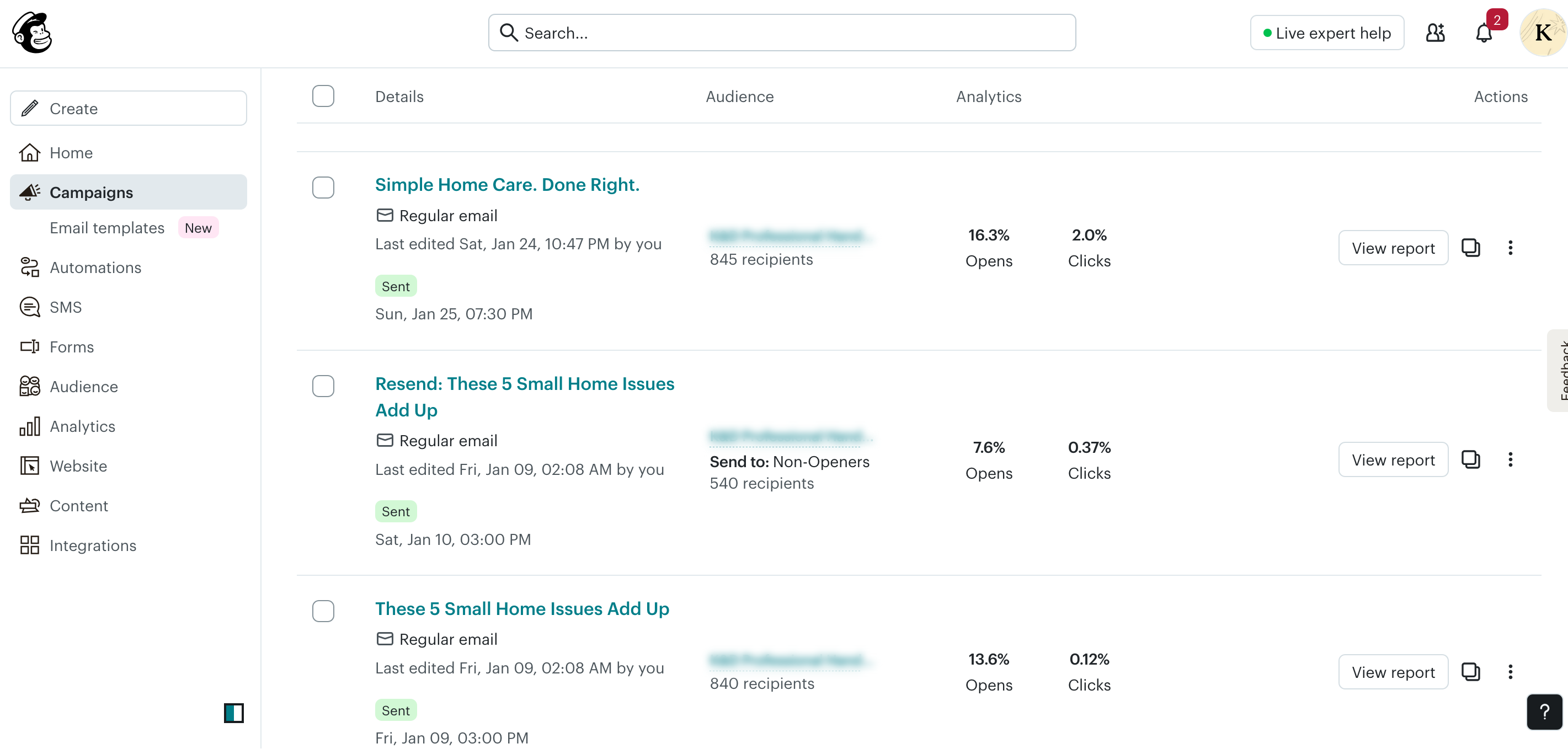
The campaigns list shows sent emails with recipient count, open rate, and click rate for each. One feature visible in the screenshot is worth highlighting: the resend-to-non-openers functionality. The campaign “Resend: These 5 Small Home Issues Add Up” was sent specifically to the 540 contacts who did not open the original send.
This is a genuinely useful feature for small businesses. Resending to non-openers with a different subject line is a simple way to extend the reach of a campaign without creating a new one from scratch.
The campaign creation flow itself is step-based: select your audience, build your email, set your subject line, then schedule or send. It is straightforward enough that most users can set up and send a campaign without much guidance.
Automations
Mailchimp’s automation builder has improved meaningfully in recent years. It uses a visual canvas with if/else branching logic.
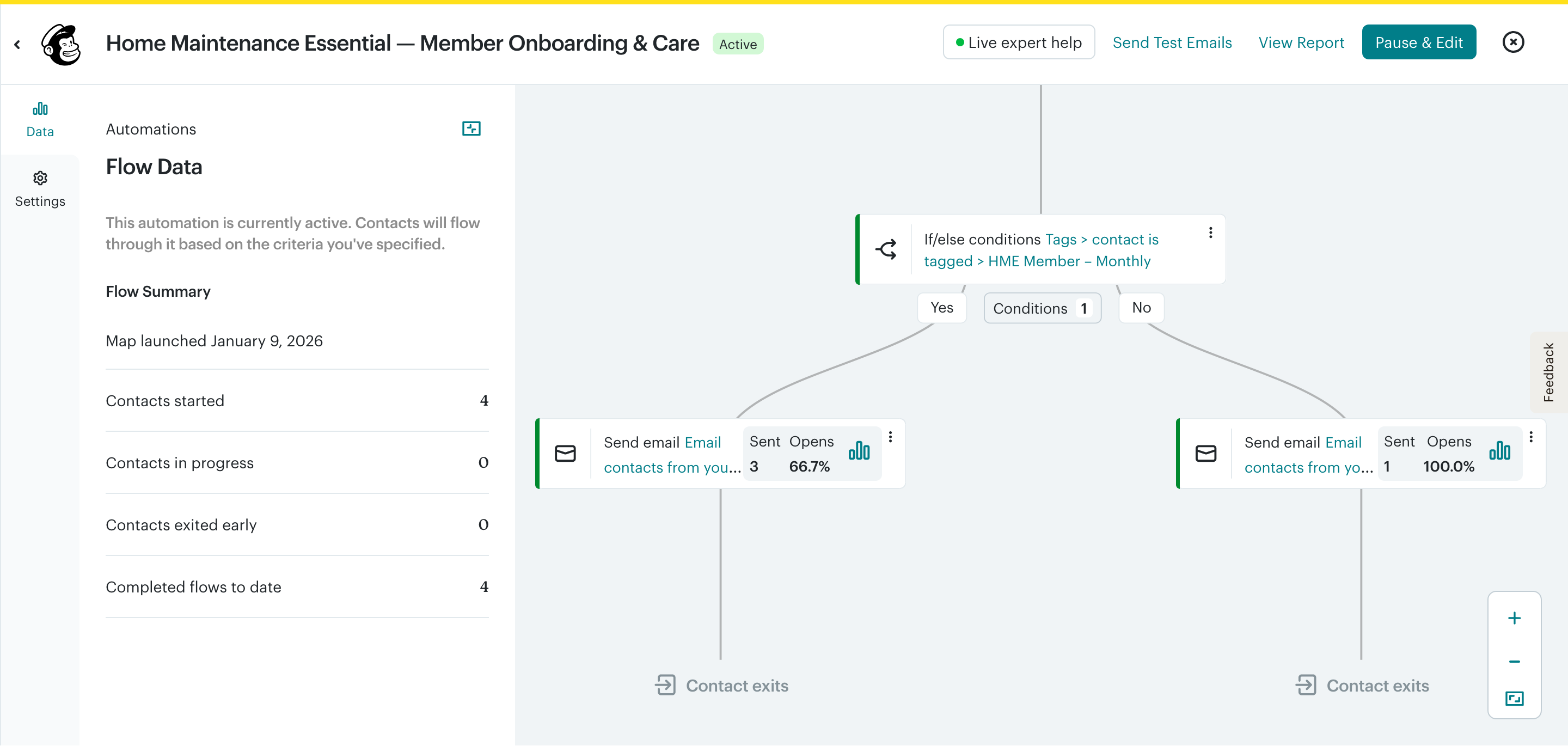
The automation shown is a member onboarding flow with a conditional split based on contact tags. The if/else condition checks whether a contact is tagged as an HME Member – Monthly, then routes them to different emails depending on that condition.
This kind of tag-based branching works well for service businesses, membership programmes, and local brands. You can build sequences that send different content to different subscriber types based on how they signed up or what tags they carry.
What Mailchimp’s automation builder does not do as well is trigger flows based on real-time shopping behaviour. Abandoned cart flows, post-purchase sequences, and browse-abandonment triggers that pull live Shopify data work differently in Mailchimp compared to Klaviyo. They are available in paid plans, but the ecommerce trigger depth is more limited.
For a service business or a small store with straightforward needs, such as a welcome sequence, onboarding series, or re-engagement flow, Mailchimp’s automation builder handles those cases without much friction.
Forms and List Growth
Mailchimp includes a popup forms tool with its own performance dashboard.
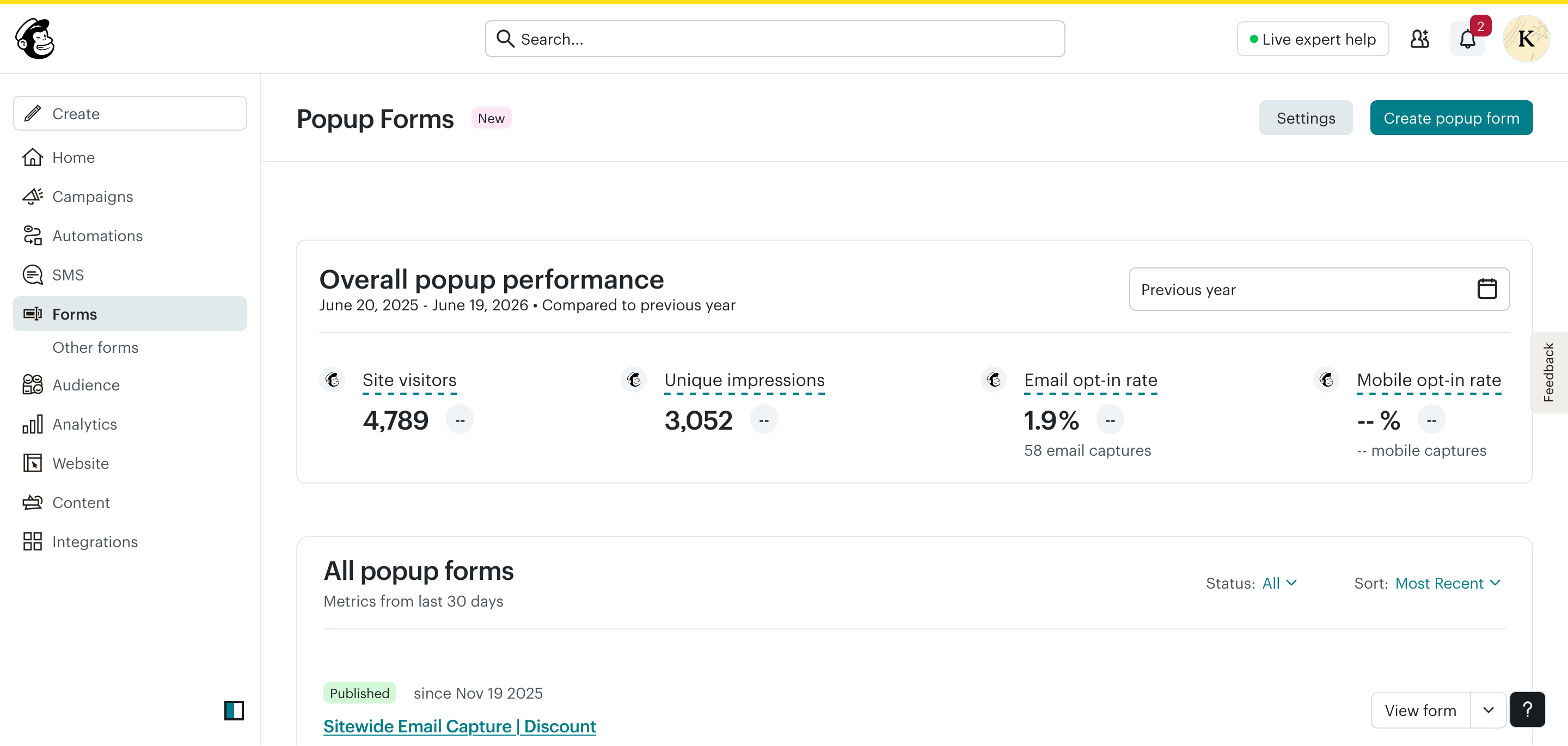
The Forms section shows overall popup performance metrics: site visitors, unique impressions, email opt-in rate, and total captures. The published popup in this account, “Sitewide Email Capture | Discount,” has been live since November 2025 and generated 58 email captures from 3,052 unique impressions, giving a 1.9% opt-in rate.
That rate is on the lower end, which is fairly common for sitewide popups without specific targeting. Mailchimp allows you to configure popup timing, targeting, and design, but the popup builder is marked as New, suggesting it is still being expanded.
Beyond popup forms, Mailchimp also supports embedded forms, landing pages, and subscriber preference pages. For small businesses building their list from scratch, these tools cover the basics without needing a third-party form tool.
Mailchimp Pricing for Indian Users
This is one area where Mailchimp stands out clearly for Indian users.
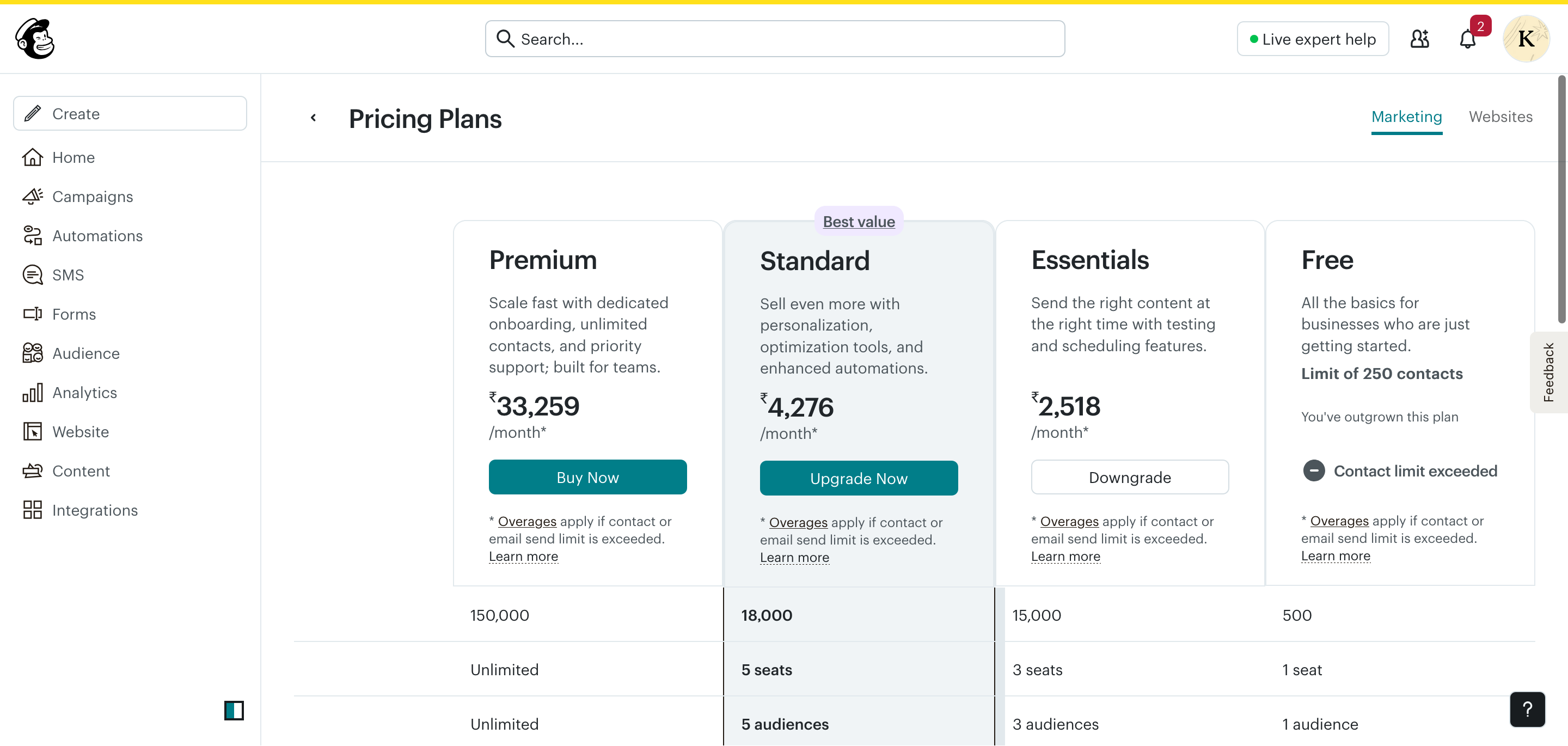
Pricing checked: June 2026. Always verify current pricing at mailchimp.com/pricing because rates and plan details can change.
| Plan | Contacts | Monthly Sends | Price (INR) | Seats |
|---|---|---|---|---|
| Free | 250 | 500 | ₹0 | 1 |
| Essentials | Up to limit | 15,000 | ₹2,518/month | 3 |
| Standard | Up to limit | 18,000 | ₹4,276/month | 5 |
| Premium | Unlimited | 150,000 | ₹33,259/month | Unlimited |
Pricing is shown in INR. Unlike Klaviyo, which billed in USD in the tested account, Mailchimp displayed pricing in Indian Rupees for the tested Indian account. This reduces currency conversion uncertainty and avoids the extra friction of estimating USD card charges.
The free plan is limited. 250 contacts and 500 sends per month is restrictive. If you have any meaningful list size, you will outgrow the free plan quickly. The account in the screenshot shows Contact limit exceeded on the Free plan, meaning the upgrade to Essentials was needed.
Essentials at ₹2,518/month gives you 15,000 sends per month across up to 3 audiences and 3 seats. That is workable for a small business sending weekly or bi-weekly campaigns.
Overages apply on all paid plans. If you exceed your contact count or send limit in any month, additional charges apply. Understand your list size and send frequency before choosing a plan.
The Standard plan at ₹4,276/month is marked Best value by Mailchimp and adds enhanced automations, personalisation, and optimisation tools on top of Essentials.
At the Essentials price point, Mailchimp is competitively priced for Indian users compared with Klaviyo’s USD-based pricing. For a small business sending regular campaigns, it is a manageable cost. If you are comparing the broader ecommerce trade-offs, start with the Klaviyo Review India and the Shopify Email Audit guide.
Reporting and Analytics
Mailchimp’s dashboard reporting is clear and immediately useful. The Marketing Snapshot on the home screen gives you delivery rate, open rate, click rate, clicks per unique opens, and unsubscribed rate, all in one view and filtered to the last 30 days by default.
The bot-filtered data label is a meaningful addition. Open rate inflation from email bots has been a known measurement issue in email marketing since Apple’s Mail Privacy Protection changes. Mailchimp’s attempt to filter bot activity gives you a more realistic picture of actual engagement.
The campaign list view also shows per-campaign performance, so you can compare open and click rates across individual sends without needing to dig into separate reports.
Where Mailchimp’s analytics fall short compared with ecommerce-focused tools is revenue attribution. There is no built-in email revenue tracking comparable to Klaviyo’s unless your store is connected through Mailchimp’s ecommerce integrations. For service businesses and newsletter operators, this is not a problem. For Shopify stores trying to measure email ROI, it is a gap worth considering.
What Stood Out During Testing
After spending time inside the account, three things stood out:
- The dashboard is easier to understand than most email platforms.
- Mailchimp consistently suggests next actions rather than leaving users to figure everything out themselves.
- The resend-to-non-openers workflow is one of the simplest implementations I have used.
For a small business owner managing email marketing without a dedicated team, those details matter more than having the most advanced automation engine.
Pros and Cons
Pros
- Pricing shown in INR, reducing USD conversion friction for Indian users.
- Beginner-friendly setup with guided nudges and walkthroughs.
- Clean, well-organised dashboard with bot-filtered data.
- Resend-to-non-openers feature built into campaign management.
- Visual automation builder with if/else branching.
- Survey block in the email editor, useful for collecting feedback.
- Forms, landing pages, and subscriber preference pages included.
- SMS marketing capabilities are available in supported regions and plans.
- Free plan available to test the platform.
Cons
- Free plan is very limited at 250 contacts and 500 sends per month.
- Automation depth for ecommerce is weaker than Klaviyo or Omnisend.
- Segmentation is tag and condition-based, not deeply purchase-behaviour-based.
- Overage charges apply if you exceed contact or send limits.
- Popup builder is new and still being developed.
- Revenue attribution reporting requires ecommerce integration setup.
- Not the strongest choice for Shopify stores needing deep retention flows.
Who Should Use Mailchimp?
Mailchimp is a good fit if you:
- Run a service business, local brand, or membership-based operation.
- Are early-stage and want a tool with INR pricing and a usable free tier.
- Send regular campaigns and newsletters to an engaged list.
- Need basic automation like welcome sequences and onboarding flows.
- Want a platform that can support email and, where available, SMS capabilities.
- Prefer a tool with guided setup and an approachable learning curve.
Who Should Avoid Mailchimp?
Mailchimp is probably not the right fit if you:
- Run a growing Shopify store and need deep ecommerce automation.
- Want purchase-behaviour segmentation and post-purchase flows.
- Need revenue attribution tied to individual email campaigns or flows.
- Are planning to scale your list significantly and want predictable pricing without overage risk.
- Need advanced conditional logic or multi-branch automation beyond basic if/else.
For ecommerce-specific needs, Klaviyo or Omnisend are worth evaluating alongside Mailchimp. If your main concern is retention, segmentation, or flow performance, the Shopify Email Segmentation Strategy guide will also help you evaluate what your setup actually needs.
Mailchimp Alternatives
- Klaviyo: deeper ecommerce automation, stronger Shopify integration, and USD billing in the tested account.
- Brevo: competitive pricing and useful transactional plus marketing email features. Compare current INR availability before deciding.
- MailerLite: clean interface, good automation, and competitive pricing for small lists.
- Omnisend: ecommerce-focused like Klaviyo and strong for Shopify use cases.
- ConvertKit / Kit: better suited for creators and newsletter operators.
Why This Review Exists
I work with email marketing platforms including Mailchimp, Klaviyo, Shopify Email, and ecommerce automation tools. Rather than reviewing Mailchimp from documentation alone, I reviewed the platform using a live account and referenced real screenshots and account data throughout this article.
Final Verdict
Mailchimp is a capable, approachable email marketing platform that still makes sense for a lot of Indian users, particularly small businesses, service providers, local brands, and early-stage stores that do not need deep ecommerce automation.
The INR pricing is a real practical advantage. The dashboard is one of the friendlier first-login experiences in the market. The resend-to-non-openers feature, survey block, and visual automation builder all add genuine value for the businesses Mailchimp is best suited to serve.
Where it starts to show its limits is with scaling Shopify stores. If your retention strategy depends on purchase-behaviour triggers, advanced segmentation, and email revenue attribution, you will likely find Mailchimp’s ecommerce tooling insufficient as you grow.
For the right use case, Mailchimp is a solid, reasonably priced choice. For the wrong one, you may outgrow it faster than you expect.
About the Reviewer
I work with ecommerce email marketing, Mailchimp automation, Klaviyo flows, Shopify email systems, and practical automation setups for small businesses and online stores. This review is based on direct testing inside a Mailchimp account, using the dashboard, audience tools, email builder, campaigns, automations, forms, pricing screen, and reporting areas.
FAQs
Is Mailchimp available in India?
Yes. Mailchimp is available to Indian users and showed pricing in INR in the tested account, which is an advantage over tools that bill only in USD.
Does Mailchimp charge in INR?
Based on testing in June 2026, Mailchimp displayed plan pricing in Indian Rupees for the tested Indian account. Always verify at mailchimp.com/pricing before purchasing.
What is Mailchimp’s free plan limit?
The free plan allows up to 250 contacts and 500 email sends per month with 1 seat and 1 audience. It is useful for testing the platform but restrictive for active use.
Is Mailchimp good for Shopify stores in India?
It works for basic Shopify email campaigns, but it is not purpose-built for ecommerce the way Klaviyo is. If Shopify automation and purchase-behaviour flows are your priority, Klaviyo or Omnisend are stronger options.
What is the cheapest paid Mailchimp plan in India?
The Essentials plan started at ₹2,518/month in the tested account in June 2026 and included 15,000 email sends, 3 seats, and 3 audiences. Overages apply if you exceed contact or send limits.
Can Mailchimp send SMS in India?
Mailchimp includes SMS marketing capabilities in supported regions and plans. Availability can vary by country, so Indian businesses should verify current support before relying on SMS as part of their strategy.
Does Mailchimp have automation?
Yes. Mailchimp has a visual automation builder with if/else branching, tag-based conditions, and multi-step sequences. It is functional for welcome flows, onboarding, and basic re-engagement. For advanced ecommerce automation, the depth is more limited than dedicated ecommerce tools.
Key Takeaways
- Mailchimp pricing was displayed in INR for the tested Indian account.
- The free plan allows 250 contacts and 500 sends per month, which is limited but useful for testing.
- The tested Essentials plan started at ₹2,518/month, and Standard was shown at ₹4,276/month.
- Automation uses a visual canvas with if/else branching and is functional for most small business needs.
- Segmentation is tag and condition-based, not deeply purchase-behaviour-based.
- Resend-to-non-openers is a useful built-in feature for campaign management.
- Mailchimp is best for small businesses, service providers, and early-stage stores.
- SMS support should be verified for India before making it part of your marketing strategy.
- It is not the strongest fit for growing Shopify stores that need ecommerce-specific retention flows.
Review Method
This review is based on hands-on testing in a Mailchimp account, including the dashboard, audience management, email editor, campaign list, automation builder, popup forms, pricing screen, and reporting view. Screenshots were captured from that account. Pricing was checked in June 2026 and may change, so verify current plan details before buying.
Related Guides
- Klaviyo Review India
- Shopify Email Audit: What I Check First
- My Shopify Email Segmentation Strategy
- Email Marketing KPIs for Shopify
Written by Kiran Daparthi, who works with ecommerce email marketing, Mailchimp, Klaviyo, Shopify email flows, and practical email automation setups for small businesses and online stores.
Pricing verified: June 2026. Pricing and features may change. Always check the official Mailchimp pricing page before making a purchase decision.

Related reviews

Best Email Marketing Software for Contractors (2026)
A practical comparison of Mailchimp, Constant Contact, Brevo, MailerLite, Kit, and field service marketing tools for contractors.
Best Email Marketing Software for Hair Salons & Spas (2026)
A practical comparison of Mailchimp, Constant Contact, Brevo, MailerLite, Kit, and booking-software marketing tools for salons and spas.
Best Email Marketing Software for Restaurants (2026)
A practical comparison of Mailchimp, Constant Contact, Brevo, MailerLite, Kit, and Toast Marketing for restaurant email marketing.