Klaviyo vs Mailchimp India: Which Is Better for Your Business? (2026)
AT A GLANCE
Klaviyo is stronger for Shopify retention and purchase-behaviour automation. Mailchimp is more approachable for Indian small businesses that value INR billing and simpler setup.
Quick Summary
- Klaviyo is purpose-built for ecommerce: stronger Shopify integration, deeper segmentation, better retention flows
- Mailchimp is broader: better for service businesses, local brands, creators, and early-stage stores
- Mailchimp bills in INR; Klaviyo bills in USD only: a real cost difference for Indian users
- Neither tool is universally better; the right choice depends on what your business actually needs
- Choose Klaviyo if you run a Shopify store and retention is your focus
- Choose Mailchimp if you are a small business, service provider, or just getting started
Which One Would I Choose?
If I were running a Shopify store generating consistent monthly orders and wanted email marketing to drive repeat purchases, I would choose Klaviyo.
If I were running a service business, local company, membership organisation, consultancy, or early-stage business sending newsletters and basic automations, I would choose Mailchimp.
The deciding factor is not the software itself. The deciding factor is whether your business depends on purchase-behaviour data.
Why This Comparison Matters for Indian Users
Most Klaviyo vs Mailchimp comparisons are written for US or European audiences. The pricing comparison alone looks different when you factor in INR billing, currency conversion costs, and the practical realities of running a small business or ecommerce store in India.
This comparison covers both tools from an Indian buyer’s perspective. pricing in real terms, what each platform actually does well, and which business types each one genuinely suits.
I tested both platforms using active accounts. Screenshots throughout this article are from those accounts.
Quick Verdict by Use Case
Before getting into the detail:
| Business Type | Better Choice | Why |
|---|---|---|
| Shopify / ecommerce store | Klaviyo | Purchase-behaviour flows, Shopify sync, segmentation depth |
| Small business / local brand | Mailchimp | INR billing, beginner-friendly, simpler setup |
| Service business | Mailchimp | Tag-based automation fits service workflows |
| Creator / newsletter | Mailchimp or alternatives | Neither is purpose-built for newsletters |
| Early-stage store (small list) | Mailchimp | Free plan more accessible, INR pricing |
| Scaling D2C brand | Klaviyo | Retention infrastructure built for growth |
Platform Overview
Klaviyo
Klaviyo launched in 2012 and has focused almost entirely on ecommerce email and SMS marketing. Its core strength is pulling data from platforms like Shopify and using that data to power automated flows, precise segmentation, and revenue attribution.
It is not trying to serve every type of business. That focus is what makes it strong for ecommerce, and less relevant for everything else.
Mailchimp
Mailchimp has been around since 2001 and built its reputation as the go-to tool for small businesses and newsletter operators. Over the years it has expanded into automations, SMS, landing pages, forms, and basic website tools.
It serves a much wider range of business types than Klaviyo, which is both its advantage and its limitation. It does many things reasonably well without doing any single thing as deeply as a specialist tool.
Dashboard and Setup
Klaviyo
Klaviyo’s dashboard requires some orientation. The home screen is relatively sparse until you configure it. you need to set up your own dashboards to see meaningful data. The navigation covers Campaigns, Flows, Website, Social, Audience, Content, Analytics, and Integrations, which can feel like a lot on first login.
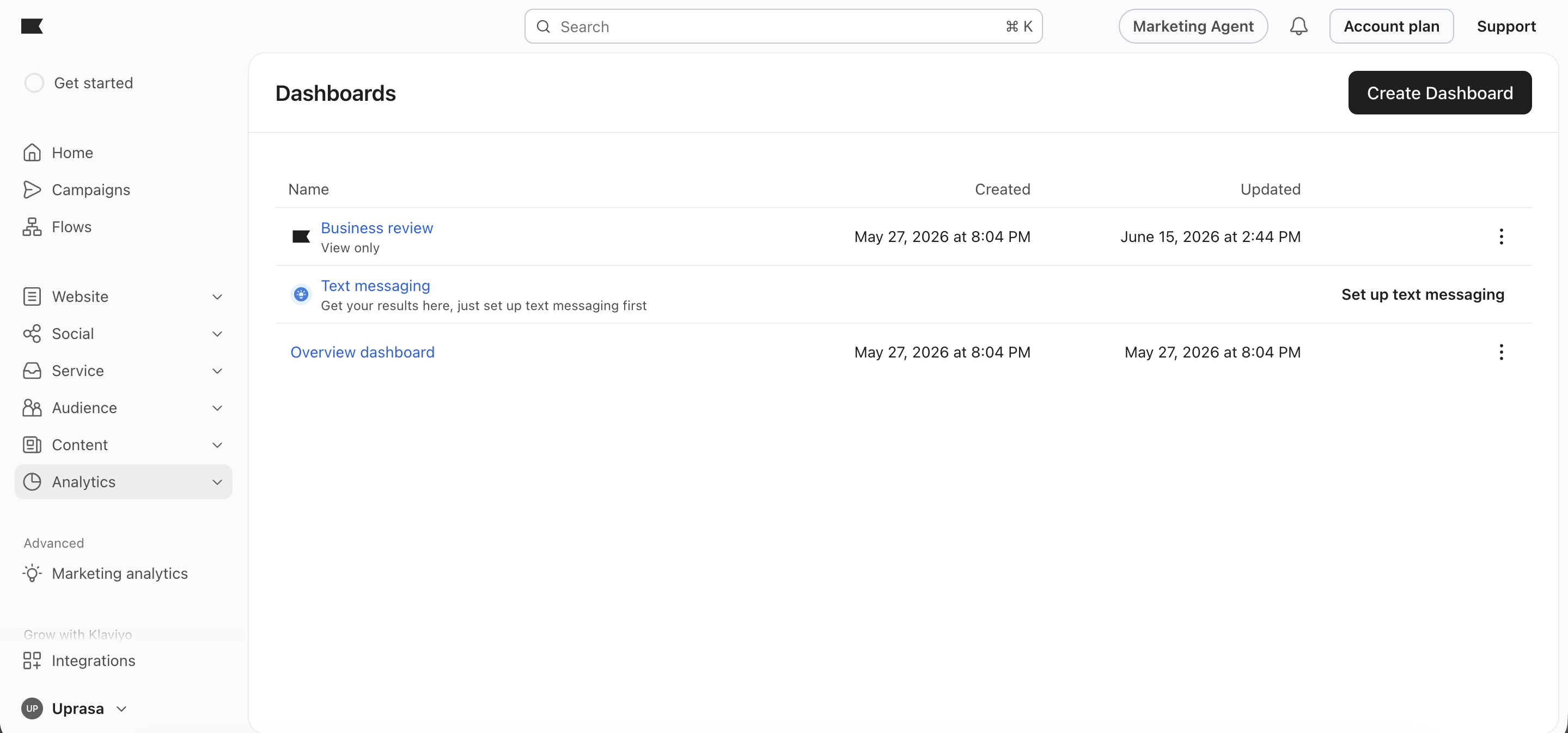
The platform rewards users who take time to learn its structure. Once set up, the dashboards are powerful. But the first-login experience is more open-ended than guided.
Mailchimp
Mailchimp’s dashboard shows useful data immediately. The Marketing Snapshot surfaces total sends, delivery rate, open rate, click rate, clicks per unique opens, and unsubscribed rate. all on the home screen, filtered to the last 30 days.
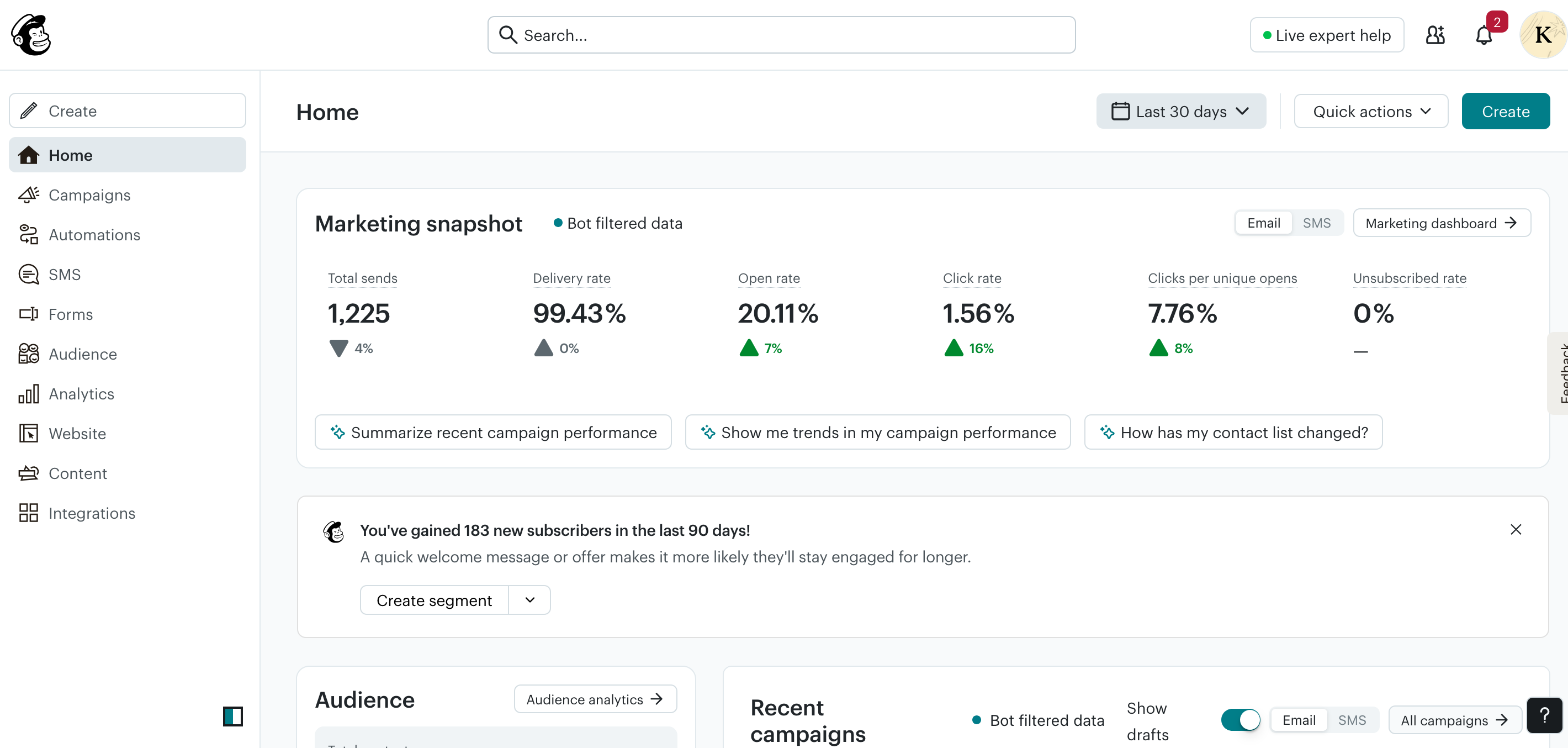
The bot-filtered data label is a useful detail. Mailchimp attempts to remove bot-inflated open rates from the figures you see. The platform also surfaces contextual nudges like “You’ve gained 183 new subscribers in the last 90 days. create a segment” which makes the next step clear without requiring you to look for it.
Winner: Mailchimp for ease of setup and immediate usefulness. Klaviyo takes longer to configure but becomes more powerful once set up.
Shopify Integration
Klaviyo
Klaviyo’s Shopify integration is bidirectional. it syncs data from Shopify into Klaviyo and back. Onsite tracking, order data, customer profiles, and product catalogue all flow into the platform automatically once connected.
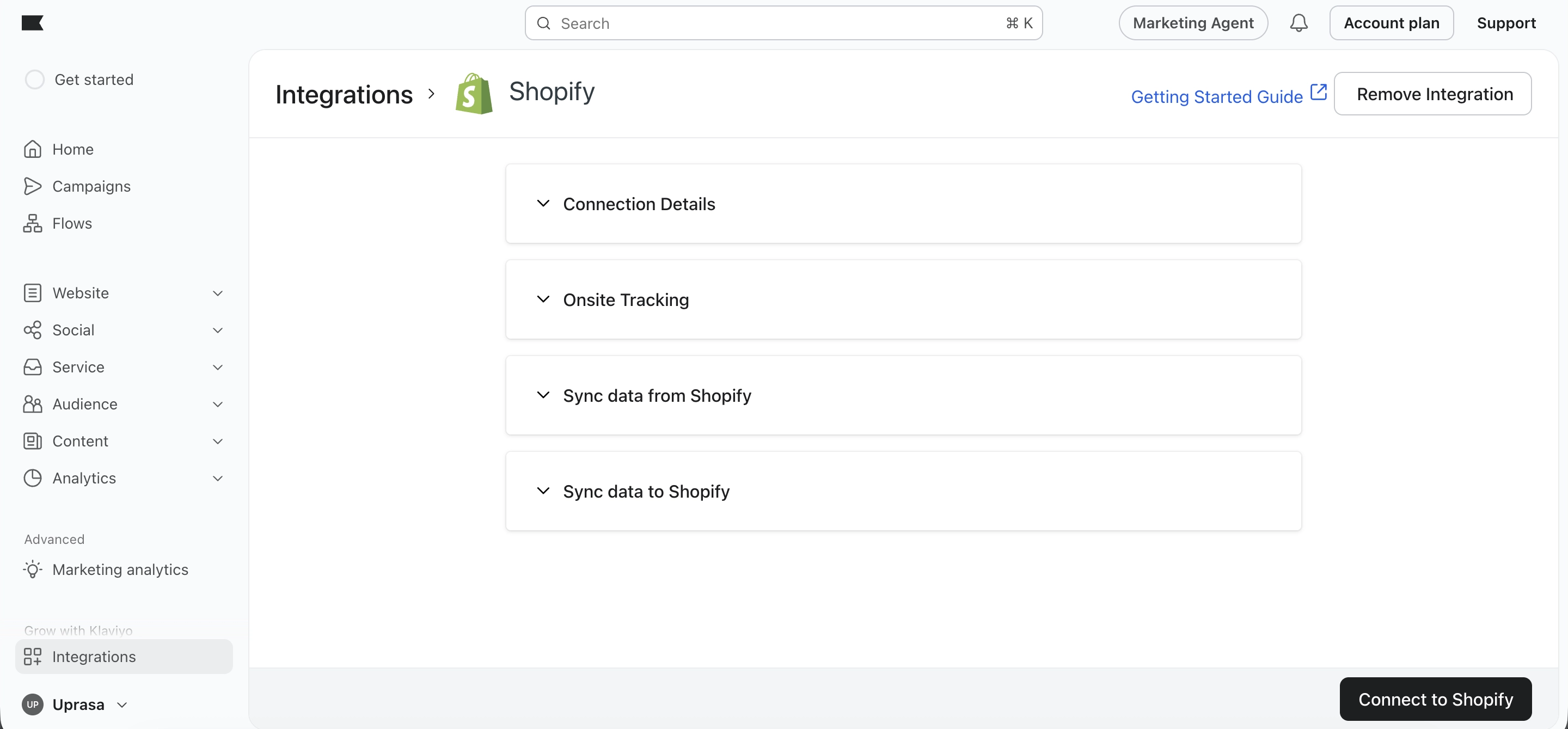
This means you can trigger flows based on real purchase events, segment by product purchased or order count, and attribute email revenue to specific campaigns and flows. without any manual data work. For more detail on the ecommerce side, see the Klaviyo Review India.
Mailchimp
Mailchimp has a Shopify integration but it works differently. The connection is available and supports basic ecommerce triggers like abandoned cart and order confirmation, but the depth of data sync and the granularity of purchase-behaviour triggers is more limited than Klaviyo.
For straightforward ecommerce campaigns. product announcements, seasonal promotions. Mailchimp’s Shopify connection is sufficient. For sophisticated retention flows that rely on live purchase data, it starts to show its limits. The Mailchimp Review India covers where it still works well for smaller businesses.
Winner: Klaviyo. the Shopify integration is deeper, more reliable, and better suited for ecommerce-specific automation.
Email Builder
Klaviyo
Klaviyo’s editor includes ecommerce-specific content blocks. particularly the Product block, which pulls live product data from your Shopify store directly into an email. The editor has desktop/mobile preview, autosave, and AI drafting.
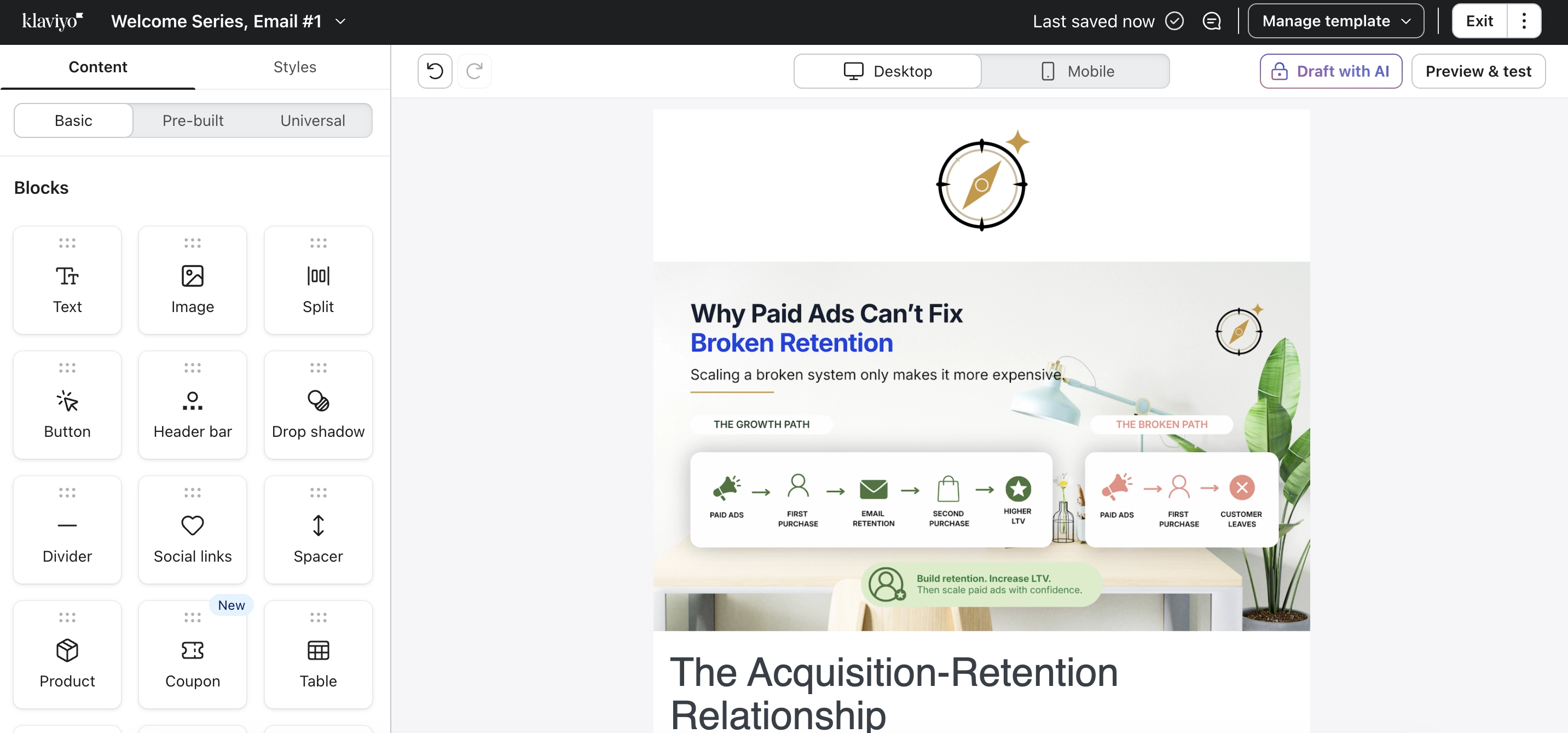
The Product block is the key differentiator. Being able to pull live inventory, pricing, and product images into an email without manually updating content saves meaningful time for ecommerce stores.
Mailchimp
Mailchimp’s email editor is slightly more approachable and includes a broader range of content block types: Image, Heading, Paragraph, Button, Divider, Spacer, Video, Social, Logo, Survey, Code, Apps, Product, Product Rec, and Footer.
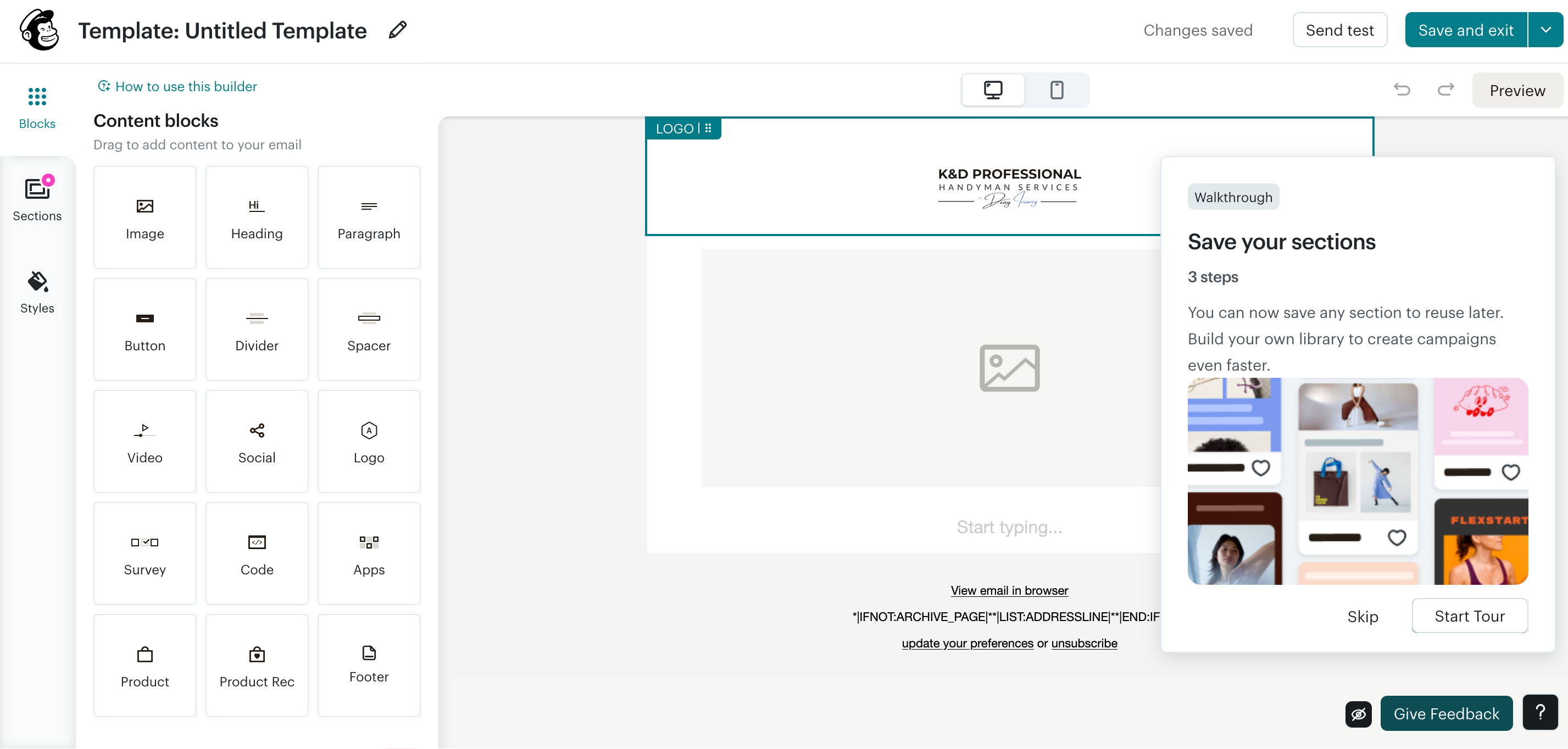
The Survey block is a standout feature. you can embed a feedback question directly inside an email without sending subscribers to an external page. The editor also has a Sections tab for saving reusable layout blocks, which speeds up campaign creation once you have built a few templates.
Both editors autosave and include desktop/mobile preview. Mailchimp’s is slightly friendlier for beginners. Klaviyo’s is more useful for ecommerce-specific content.
Winner: Tie. depends on use case. Klaviyo for ecommerce content; Mailchimp for general flexibility and ease.
Automation
Klaviyo
Klaviyo’s flow builder is visual and ecommerce-first. Flows are triggered by subscriber behaviour. joining a list, abandoning a cart, making a purchase, viewing a product. The canvas shows the full sequence with delays, conditional splits, and multi-channel actions.
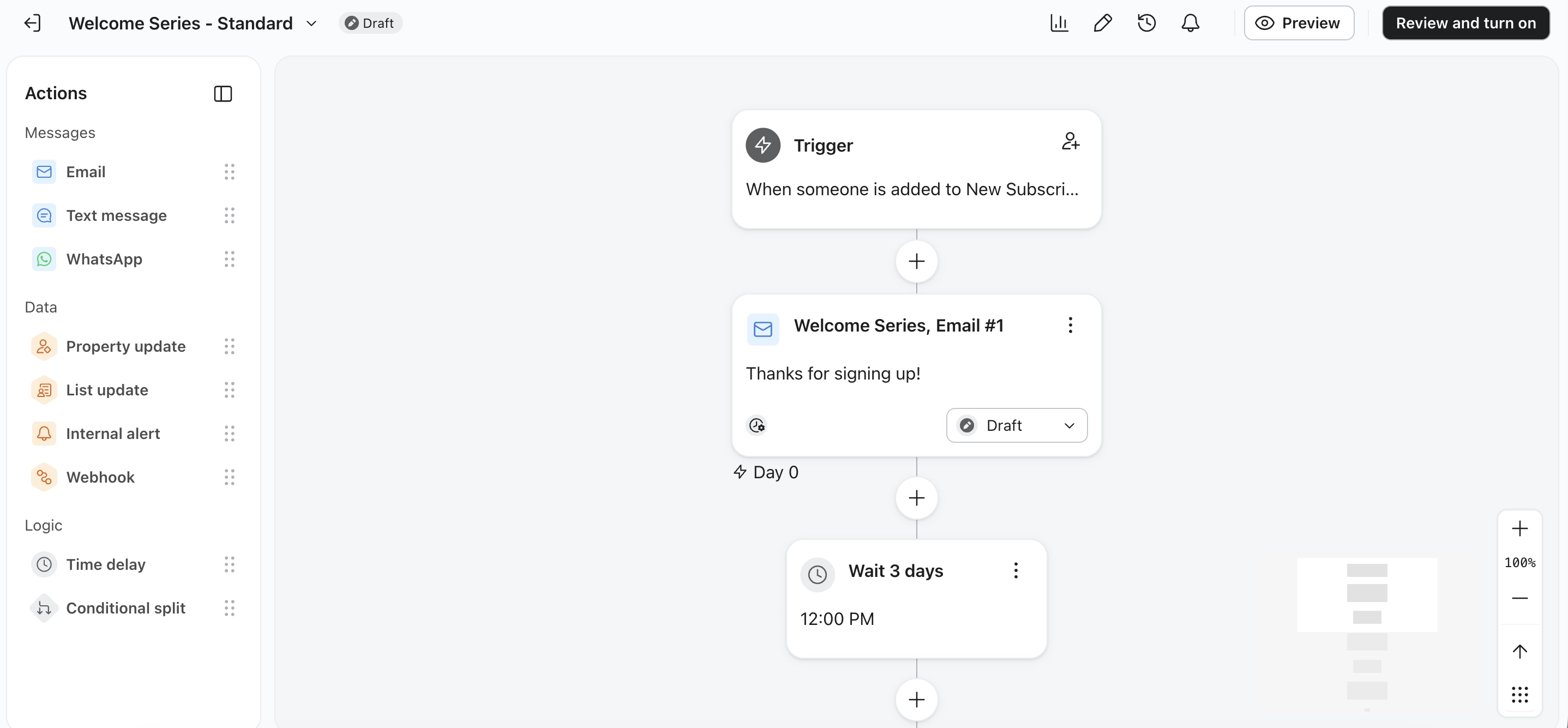
Pre-built flow templates for ecommerce are available immediately: welcome series, abandoned cart, post-purchase, win-back, browse abandonment. Conditional splits let you send different emails based on purchase history, engagement, or subscriber properties.
WhatsApp messaging is available within Klaviyo’s platform and automation ecosystem, though feature availability and setup requirements can vary by account, region, and current Klaviyo policies.
Mailchimp
Mailchimp’s automation builder uses a visual canvas with if/else branching logic. Automations are built around contact conditions. typically tag-based rather than real-time ecommerce behaviour.
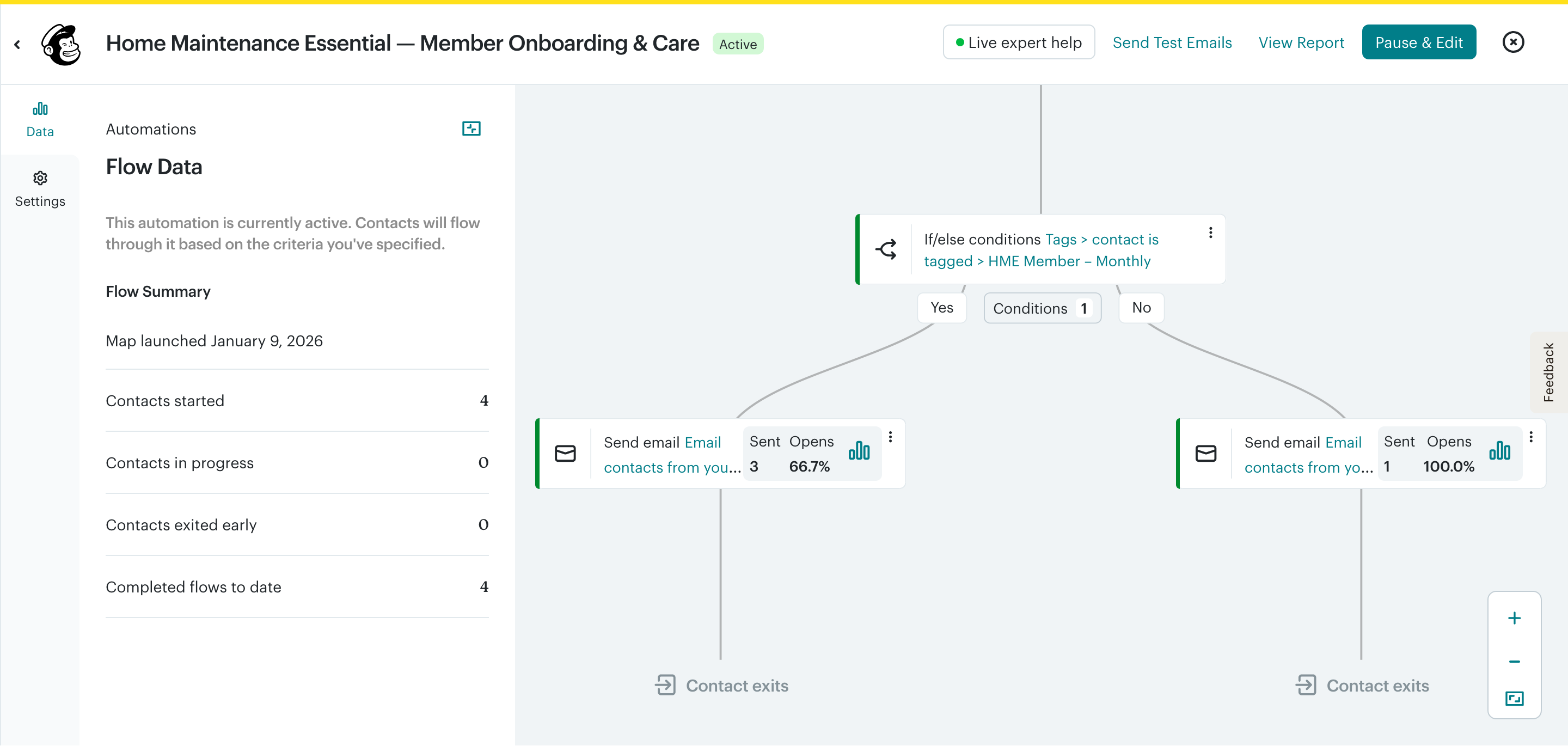
The tag-based branching works well for service businesses, membership programmes, and onboarding sequences. Where it falls short is in triggering flows from live purchase events at the same granularity Klaviyo manages.
Mailchimp does support abandoned cart and basic ecommerce triggers on paid plans, but the trigger depth and the ability to use purchase data inside conditions is more limited.
Winner: Klaviyo for ecommerce automation. Mailchimp for tag-based service and onboarding flows.
Segmentation
Klaviyo
Klaviyo creates pre-built segments automatically. Engaged 90/60/30 Days, New Subscribers, and Shopify-connected health check lists, and lets you build custom segments based on purchase history, product viewed, order count, predicted lifetime value, and more.
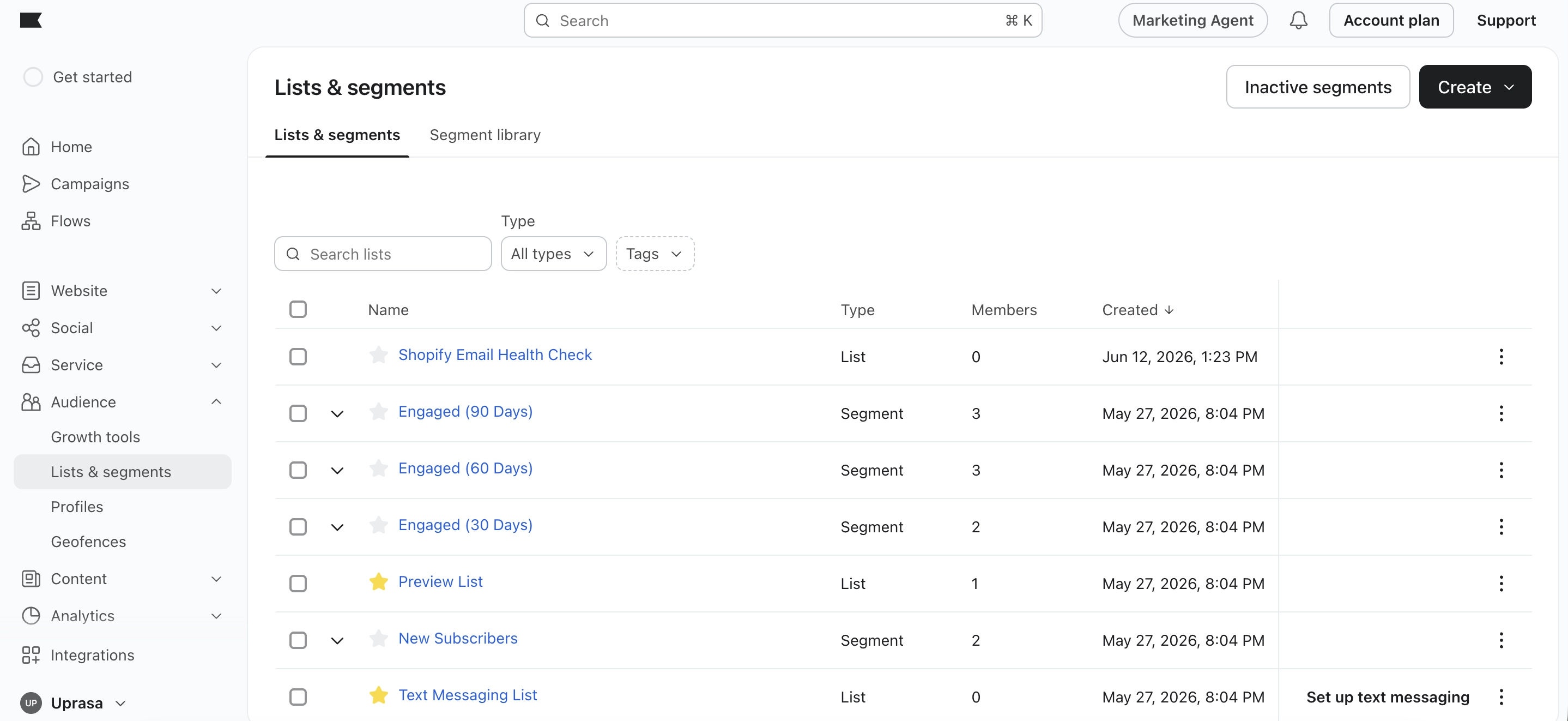
The key advantage: segmentation pulls directly from Shopify data. You can build a segment of customers who bought Product A but not Product B, or customers who have ordered three or more times in the last six months, without any manual tagging.
Mailchimp
Mailchimp’s segmentation uses tags, subscription status, signup source, and some engagement conditions. It is practical for most small business needs but does not have the same depth of purchase-behaviour logic.
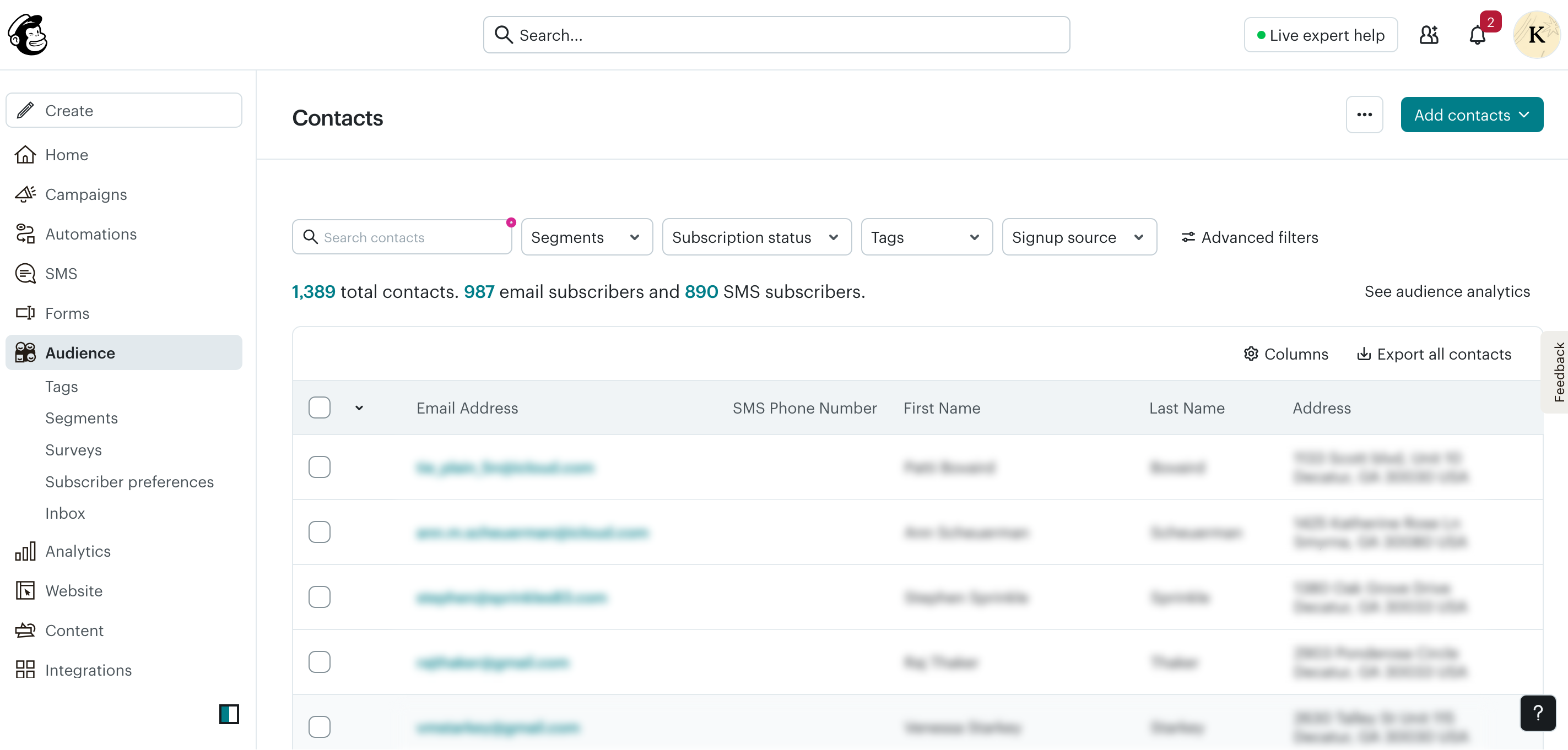
You can build useful segments in Mailchimp. by engagement, by signup source, by tag, but creating segments based on what someone bought, how many times they ordered, or what their predicted value is requires either manual tagging or a third-party integration.
Winner: Klaviyo. the segmentation depth is in a different category for ecommerce use cases.
Campaigns
Klaviyo
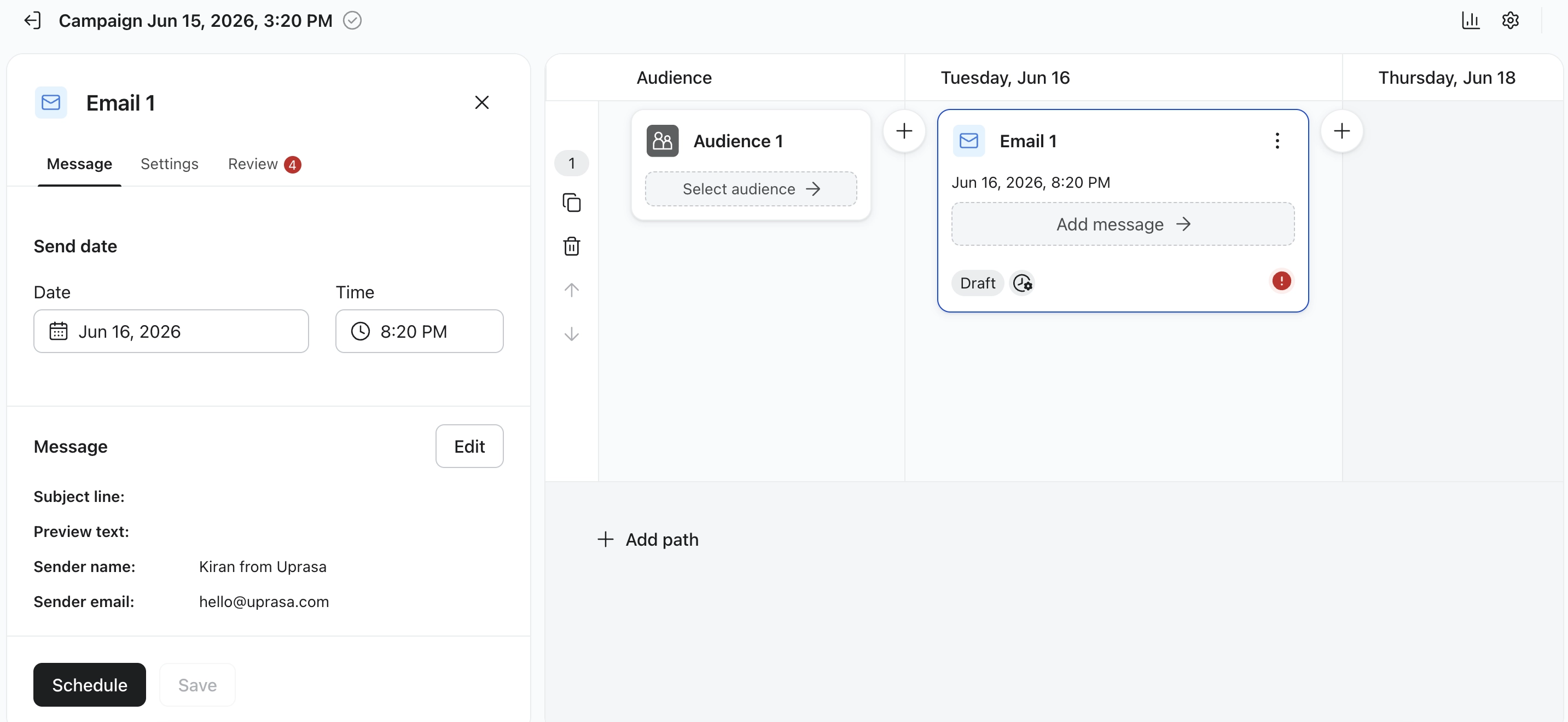
Klaviyo’s campaign setup follows a structured flow: audience selection, message build, review, schedule. Sender name and email carry through from account settings. A/B path options are available at the campaign level.
Mailchimp
Mailchimp’s campaign management adds one feature that Klaviyo does not surface as prominently at the campaign level: resend to non-openers. You can resend a campaign to contacts who did not open the original send, directly from the campaign list.
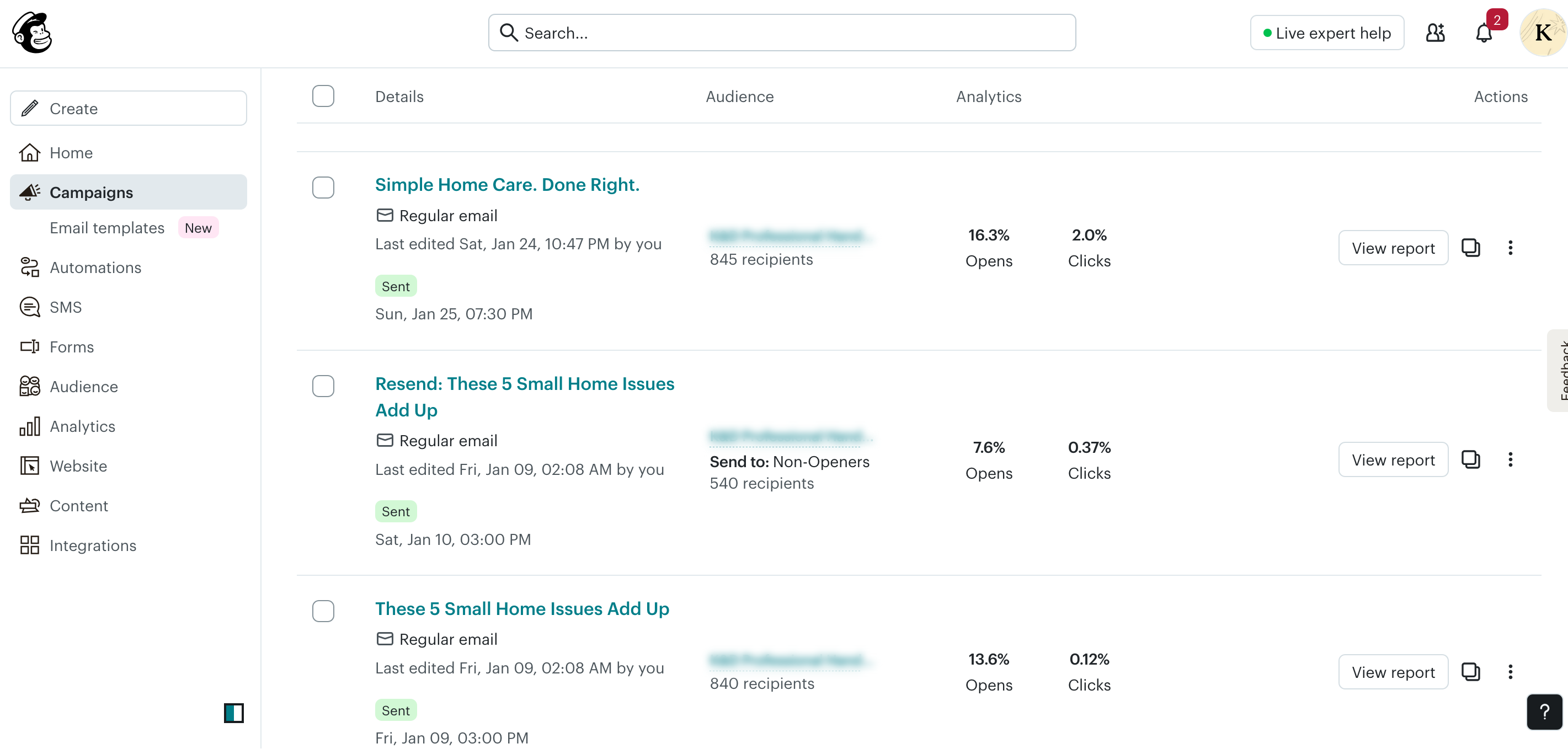
This is a practical feature for small businesses that send regular newsletters or promotional emails and want to extend reach without building a full re-engagement automation.
Winner: Tie. Klaviyo has cleaner audience targeting; Mailchimp’s resend-to-non-openers is a useful campaign-level feature.
Forms and List Growth
Klaviyo
Klaviyo includes signup forms and popups as part of its platform. Forms can be triggered by behaviour, tied to specific lists or segments, and connected to flows automatically.
Mailchimp
Mailchimp has expanded its forms offering significantly. The Popup Forms section (marked “New” in the platform) has its own performance dashboard showing site visitors, impressions, opt-in rate, and email captures.
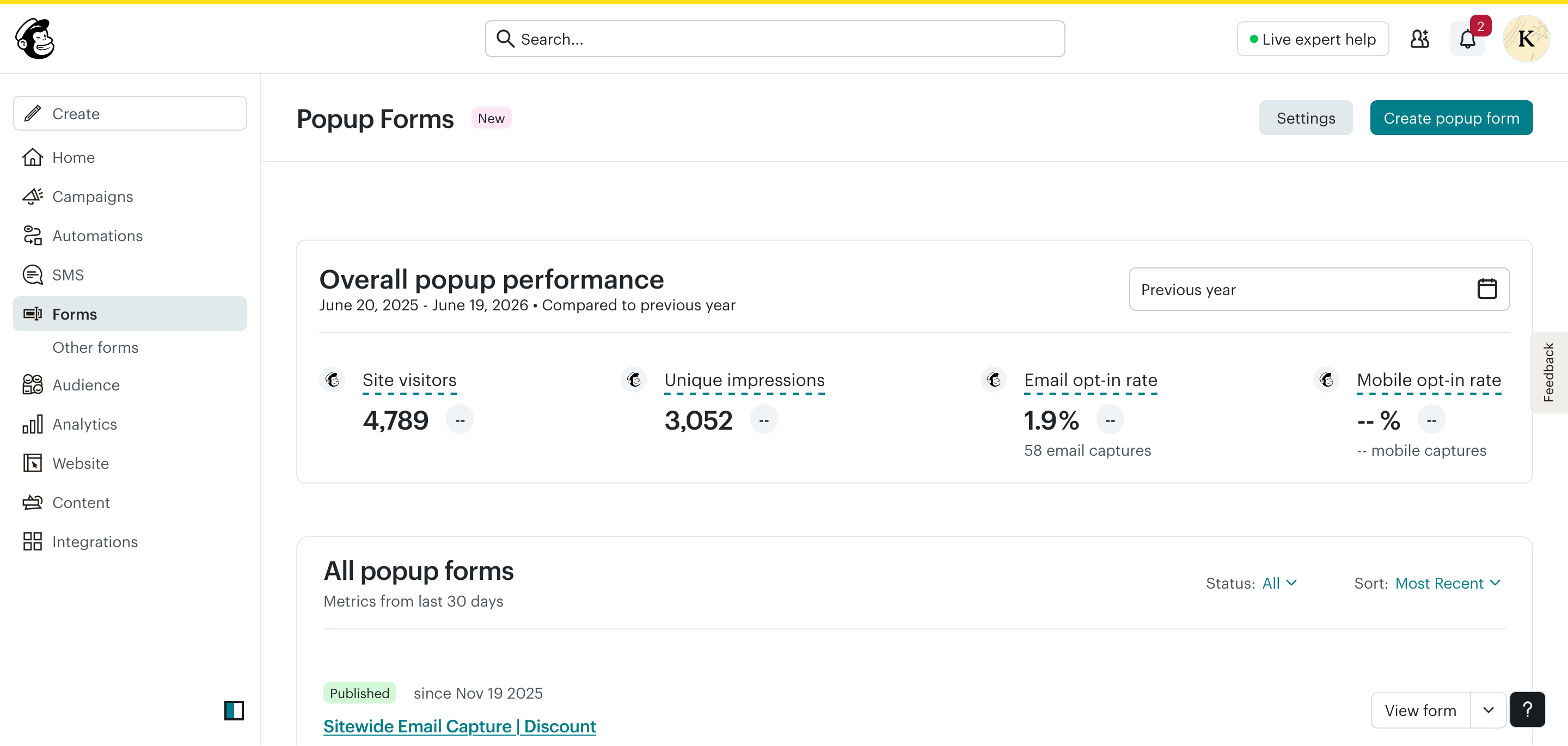
Beyond popups, Mailchimp also includes embedded forms, landing pages, and subscriber preference pages. The popup builder is newer and still being developed.
Winner: Comparable for basic list growth needs. Both cover popups and embedded forms. Klaviyo’s form-to-flow connection is tighter for ecommerce.
Reporting and Analytics
Klaviyo
Klaviyo’s reporting is ecommerce-focused. It attributes revenue to email sends and flows, when a subscriber receives an email and makes a purchase within the attribution window, that revenue is credited. This gives you a direct line from email activity to store revenue.
The dashboards require manual setup but, once configured, give you flow-level and campaign-level revenue performance.
Mailchimp
Mailchimp’s home dashboard shows delivery rate, open rate, click rate, and unsubscribed rate with bot-filtered data. Per-campaign reporting shows opens and clicks for each send.
Revenue attribution in Mailchimp requires ecommerce integration setup and is not as comprehensive as Klaviyo’s built-in attribution model. For service businesses and newsletter operators, the engagement metrics are sufficient. For ecommerce stores tracking email ROI, this is a meaningful gap.
Winner: Klaviyo for ecommerce revenue tracking. Mailchimp for straightforward engagement reporting.
Pricing Comparison for Indian Users
This is where the decision looks meaningfully different for Indian buyers compared to global comparisons.
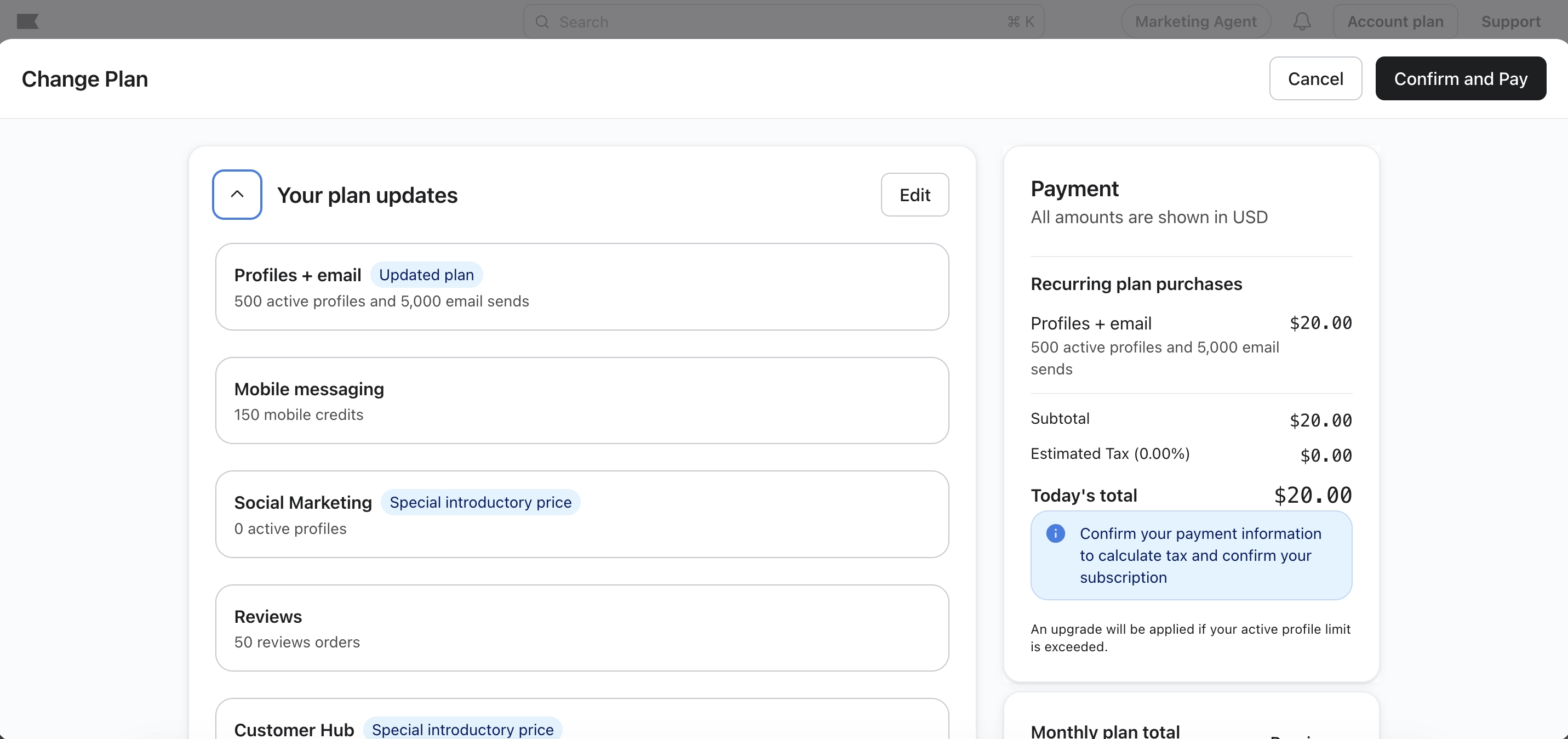
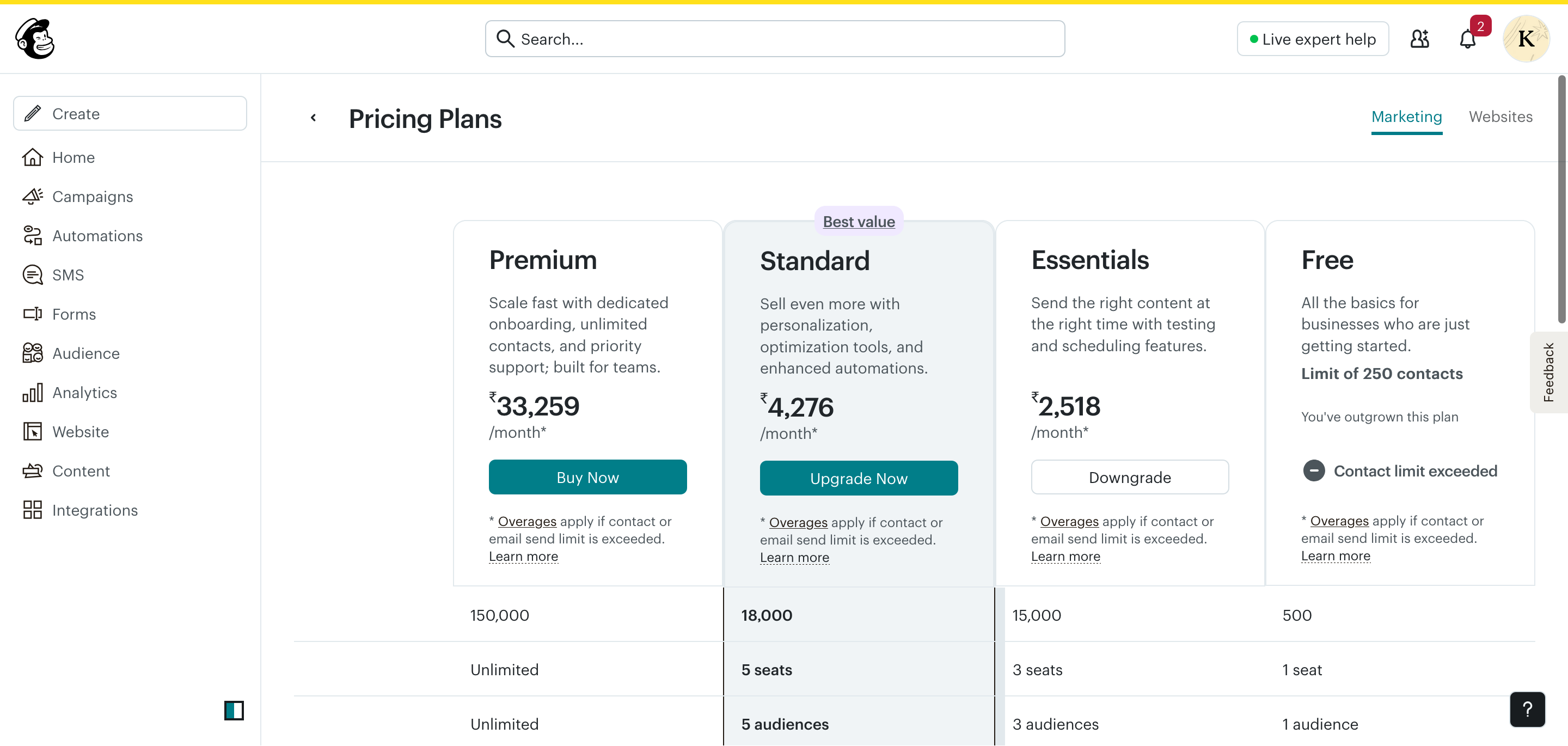
Pricing checked: June 2026. Verify current pricing at klaviyo.com/pricing and mailchimp.com/pricing before making a decision. For the detailed notes behind these screenshots, see the Klaviyo pricing section and Mailchimp pricing section.
| Klaviyo | Mailchimp | |
|---|---|---|
| Billing currency | USD only | INR (for Indian accounts) |
| Free plan | 250 profiles, 500 sends | 250 contacts, 500 sends |
| Entry paid plan | $20/month USD (~₹1,670 approx.) | ₹2,518/month |
| Pricing model | By active profiles | By contacts + send limits |
| Overage charges | Yes | Yes |
| Foreign transaction fees | Possible (USD billing) | No (INR billing) |
At face value, Klaviyo’s entry point (~$20/month USD) looks cheaper than Mailchimp’s Essentials (₹2,518/month). But the comparison shifts as your list grows. Klaviyo’s pricing scales by active profile count and can increase significantly faster than Mailchimp at mid-list sizes.
More importantly for Indian users: Mailchimp’s INR billing means no currency conversion, no foreign transaction fees, and no exchange rate uncertainty month to month. That is a practical cost and administrative advantage.
Feature Comparison Summary
| Feature | Klaviyo | Mailchimp |
|---|---|---|
| Shopify integration | Deep, bidirectional | Basic, functional |
| Email automation | Ecommerce-first, behaviour-triggered | Tag-based, condition-based |
| Segmentation | Purchase-behaviour, predictive | Tag and engagement-based |
| Email editor | Product block, ecommerce-focused | Broader blocks, Survey block |
| Campaign management | Structured, A/B paths | Resend to non-openers |
| Forms | Popups + form-to-flow connection | Popups, landing pages, embedded |
| Reporting | Revenue attribution, flow tracking | Engagement metrics, bot-filtered |
| SMS | Yes | Yes |
| Available in Klaviyo’s platform, with setup and availability varying by account and region | No native equivalent seen in this review context | |
| Billing currency (India) | USD only | INR |
| Free plan | 250 profiles / 500 sends | 250 contacts / 500 sends |
| Beginner-friendliness | Moderate learning curve | Easier setup |
Who Should Choose Klaviyo?
Choose Klaviyo if you:
- Run a Shopify store and want retention automation built around purchase behaviour
- Need to segment customers by order history, product purchased, or predicted value
- Want revenue attribution tied to specific flows and campaigns
- Are building an email programme around lifecycle stages: welcome, post-purchase, win-back, browse abandonment
- Can absorb USD billing and the cost increase as your list scales
- Want to evaluate WhatsApp as an additional channel, subject to Klaviyo account, region, and setup requirements
Who Should Choose Mailchimp?
Choose Mailchimp if you:
- Run a service business, local brand, membership programme, or early-stage store
- Want INR billing without currency conversion friction
- Need a straightforward tool with a manageable learning curve
- Send regular campaigns and newsletters to an engaged list
- Need basic automation: welcome sequences, onboarding flows, tag-based branching
- Want email and SMS in one platform at an accessible price point
- Are testing email marketing for the first time and want a tool with guided setup
FAQs
Is Klaviyo or Mailchimp better for Indian Shopify stores?
Klaviyo is the stronger choice for Shopify stores focused on retention and lifecycle email automation. Mailchimp works for simpler Shopify use cases but lacks the purchase-behaviour depth Klaviyo offers.
Which is cheaper for Indian users. Klaviyo or Mailchimp?
It depends on list size and how you calculate cost. Klaviyo’s entry price in USD can appear lower initially, but Mailchimp’s INR billing removes currency conversion costs. At mid-list sizes (2,500–5,000 contacts), Klaviyo’s pricing often works out higher in real terms for Indian users.
Does Klaviyo bill in INR?
No. As of June 2026, Klaviyo bills in USD only. Indian users pay in dollars and incur currency conversion costs.
Does Mailchimp bill in INR?
Yes. Mailchimp shows pricing and charges in INR for Indian accounts, based on testing in June 2026. Always verify at mailchimp.com/pricing.
Can I use both Klaviyo and Mailchimp together?
You could in theory, but running two email platforms simultaneously creates list management complexity and duplication. It is generally better to choose one platform suited to your needs.
Which is easier to use for beginners?
Mailchimp. The guided dashboard, contextual nudges, and walkthrough prompts make it more approachable for users new to email marketing. Klaviyo has a steeper initial learning curve.
Which has better automation. Klaviyo or Mailchimp?
Klaviyo has deeper ecommerce automation triggered by purchase behaviour. Mailchimp has functional tag-based automation better suited to service businesses and onboarding flows. The better choice depends on what you need automations to do.
Is Klaviyo worth the extra cost in India?
It can be worth the extra cost if your store depends on repeat purchases, post-purchase flows, abandoned cart recovery, product-based segmentation, and revenue attribution. If you mainly send newsletters or simple service-business automations, Mailchimp may be the more practical starting point.
Can I switch from Mailchimp to Klaviyo later?
Yes, but plan the move carefully. You will need to export contacts, preserve consent status, rebuild segments and automations, reconnect forms, and test deliverability before fully switching sending over to Klaviyo.
Which platform has better deliverability?
I cannot confirm a universal winner because deliverability depends on your sending domain, list quality, engagement, authentication, sending frequency, and content. Klaviyo gives ecommerce stores stronger segmentation tools, while Mailchimp is easier for basic list hygiene. The better result depends on how the account is managed.
Which platform is better for WooCommerce?
For WooCommerce stores that need ecommerce segmentation and lifecycle automation, Klaviyo is usually the stronger option to evaluate. For small WooCommerce shops with simple campaigns and a preference for easier setup, Mailchimp can still be a workable choice.
What Surprised Me Most
After using both platforms, the biggest surprise was how different their goals are.
Mailchimp tries to make email marketing approachable.
Klaviyo tries to make ecommerce retention measurable.
Many comparisons treat them as direct competitors, but they are often solving different problems. The right choice became much clearer once I stopped comparing features and started comparing business needs.
Key Takeaways
- Klaviyo wins on ecommerce depth: Shopify integration, purchase-behaviour flows, segmentation, and revenue attribution are all stronger
- Mailchimp wins on accessibility: INR billing, easier setup, broader use case coverage, and a functional free plan
- The billing currency difference is a real practical consideration for Indian users: Mailchimp’s INR billing removes USD conversion friction
- Neither tool is best for everyone; the right choice depends on your business type, list size, and what you need email to actually do
- For growing Shopify stores, Klaviyo’s infrastructure pays off as the list and transaction volume grows
- For small businesses, service providers, and early-stage stores, Mailchimp is a sensible, cost-accessible starting point
Related Guides
- Klaviyo Review India
- Mailchimp Review India
- My Shopify Email Segmentation Strategy
- Email Marketing KPIs for Shopify
Official Pricing Sources
Written by Kiran Daparthi, who works with ecommerce email marketing, Klaviyo, Mailchimp, Shopify email flows, and practical email automation setups for small businesses and online stores.
Pricing verified: June 2026. Pricing and features may change. Always check official pricing pages before making a purchase decision.

Related guides

Best Email Marketing Software for Contractors (2026)
A practical comparison of Mailchimp, Constant Contact, Brevo, MailerLite, Kit, and field service marketing tools for contractors.
Best Email Marketing Software for Hair Salons & Spas (2026)
A practical comparison of Mailchimp, Constant Contact, Brevo, MailerLite, Kit, and booking-software marketing tools for salons and spas.
Best Email Marketing Software for Restaurants (2026)
A practical comparison of Mailchimp, Constant Contact, Brevo, MailerLite, Kit, and Toast Marketing for restaurant email marketing.