CheckoutChamp + Klaviyo: What to Know Before You Connect Them
AT A GLANCE
The integration should be treated as unproven until customer profiles, events, flows, and revenue tracking have been tested directly.
Quick Summary
- A successful connection between CheckoutChamp and Klaviyo does not mean the integration is working correctly.
- Event mapping, including how order, customer, and subscription data passes between platforms, needs to be tested before any flows go live.
- Revenue attribution in Klaviyo should be cross-referenced with CheckoutChamp order data after launch.
- Common integration mistakes include untested flow triggers, missing customer profiles, and incorrect subscription event mapping.
- Never assume an integration works because it connects successfully. Test every event before you rely on it.
Introduction
Most Klaviyo integrations are straightforward. You connect the platform, data starts flowing, and your flows fire based on the events coming through.
CheckoutChamp is a more complex setup.
CheckoutChamp is a checkout and CRM platform used by ecommerce operators running higher-volume, often subscription-based businesses. It handles order processing, upsells, customer management, and subscription billing, which means the data it sends to Klaviyo can be more varied, and more consequential, than a standard Shopify integration.
When the integration is configured and tested correctly, it can work well. But the gap between “connected successfully” and “working correctly” is where most problems happen. Those problems tend to surface quietly, in the form of flows not firing, customers not being created, or revenue being attributed incorrectly.
This article covers what to know before you connect CheckoutChamp to Klaviyo, what to test before going live, and the most common mistakes worth avoiding.
What CheckoutChamp Sends to Klaviyo
Before getting into setup and testing, it is worth understanding what data CheckoutChamp is designed to pass to Klaviyo and why each piece matters.
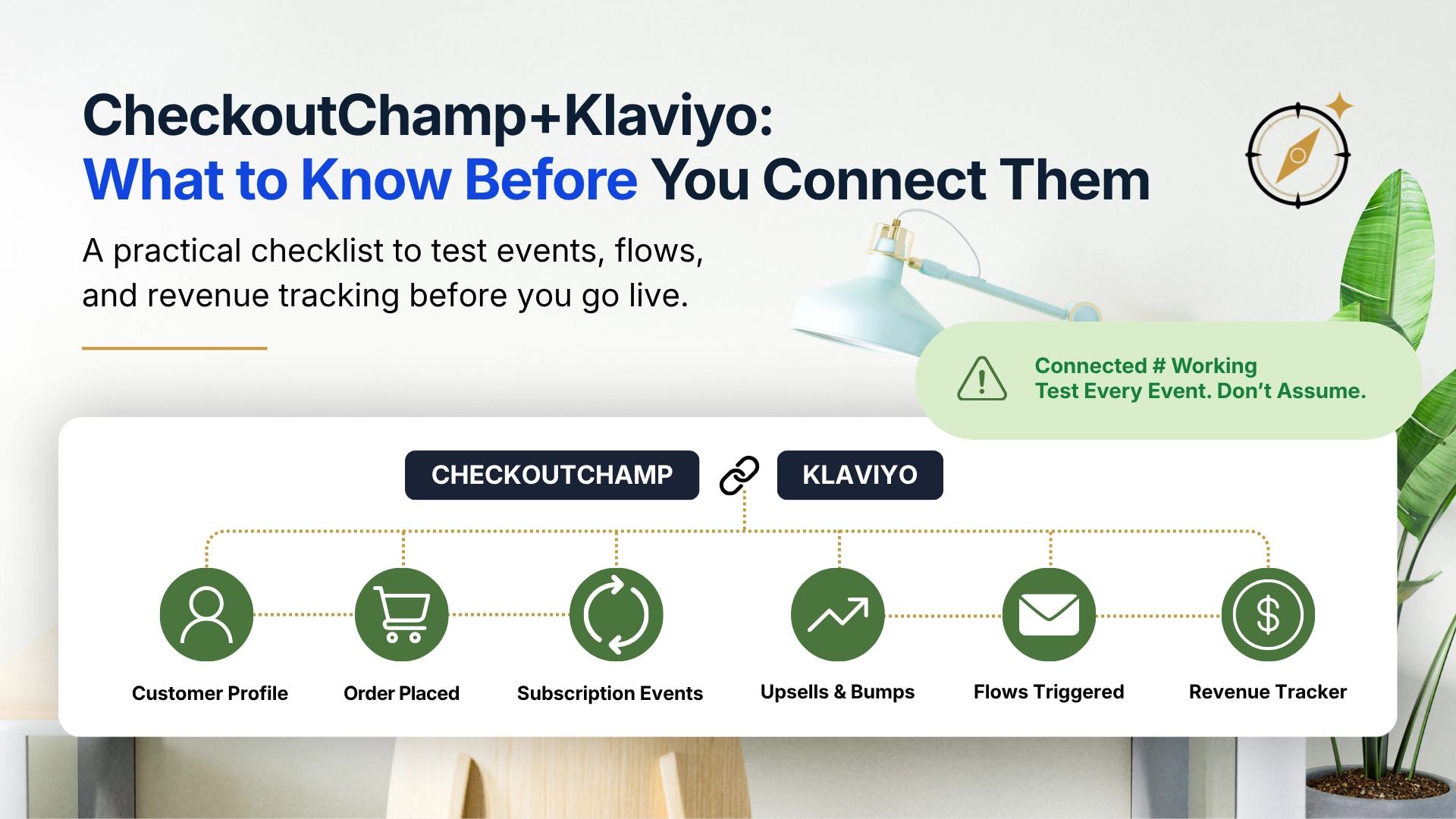
Integration Flow
CheckoutChamp
        ↓
Customer Profile
        ↓
Order Events
        ↓
Subscription Events
        ↓
Upsell Events
        ↓
Klaviyo
Missing Event
        ↓
Broken Flow
        ↓
Lost Revenue
Customer Data
When a customer completes a purchase in CheckoutChamp, a profile should be created or updated in Klaviyo with their contact information, order history, and relevant custom properties. This is the foundation everything else depends on. If customer profiles are not being created correctly, email flows cannot reach the right people.
Why This Matters
Every flow, segment, and attribution report depends on a customer profile existing first.
Order Events
CheckoutChamp integrations commonly send order-related events to Klaviyo, covering actions such as order placement, fulfilment, cancellation, or refunds depending on the setup. These events trigger flows. An order-related event can fire the post-purchase sequence. A fulfilment-related event can trigger a shipping confirmation or review request.
If order events are not mapping correctly, the flows dependent on them simply will not fire, often without any obvious error in Klaviyo’s dashboard.
Subscription Events
For stores running subscription products through CheckoutChamp, subscription events are often the most complex part of the integration.
Subscription-related events and properties may be available depending on your CheckoutChamp configuration and integration setup.
Before building subscription automations, verify exactly which subscription events are being sent to Klaviyo by placing test orders and reviewing the Klaviyo activity feed.
The exact event names, properties, and availability can vary by integration version and account configuration.
Subscription events are where integration problems are most likely to appear and hardest to catch without deliberate testing.
Upsell and Bump Order Data
CheckoutChamp is built around post-purchase upsells and order bumps. Whether these are captured as separate order events or bundled into the original order in Klaviyo depends on how the integration is configured. This affects revenue attribution and can influence which flows fire and when.
Before You Connect: What to Confirm
Before the integration goes live, a few things are worth confirming on both sides.
On the CheckoutChamp side:
- Which events are enabled for the Klaviyo integration
- How subscription events are named and structured
- Whether upsell revenue is sent as a separate event or included in the original order
- Whether the API connection uses a dedicated Klaviyo private API key
On the Klaviyo side:
- That the correct private API key is being used with appropriate permissions
- That any existing flows dependent on order or subscription events are paused until testing is complete
- That your Klaviyo account is set up to receive custom events if CheckoutChamp is sending non-standard event types
Taking 30 minutes to confirm these details before connecting can save considerably more time diagnosing problems after launch.
Setup Checklist
This is the sequence I work through when setting up or auditing a CheckoutChamp and Klaviyo integration.
1. Verify Customer Creation
Place a test order using a real email address that does not already exist in Klaviyo. After the order completes, check Klaviyo to confirm:
- A new profile was created with the correct email address
- The profile includes the expected contact properties, such as name and phone if collected
- Any custom properties you are expecting, such as order count, subscription status, or product purchased, are populated correctly
If the profile was not created, or was created with missing data, this is the first thing to resolve. Everything else depends on it.
2. Verify Order Events
In Klaviyo’s activity feed or the profile’s event history, confirm that the expected order-related event fired correctly after your test order. Check:
- The event name matches what your flows are using as a trigger
- Order value, product details, and any relevant properties are included in the event payload
- The event fired at the expected time without delay
When these server-side metrics are available in your CheckoutChamp and Klaviyo setup, check for:
- Started Checkout
- Placed Order
- Ordered Product
- Fulfilled Order
- Cancelled Order
- Refunded Order
After placing a test order, confirm the relevant events appear in the Klaviyo activity feed and contain the expected order properties.
If you are unsure what event names your CheckoutChamp integration sends, check the Klaviyo activity log immediately after placing a test order. The events should appear there in real time or shortly after processing.
3. Verify Subscription Events
If you are running subscription products, this step requires deliberate testing. Place a test subscription order and confirm:
- A subscription creation-related event fires in Klaviyo
- The event includes the expected properties, such as product, billing interval, and next charge date if applicable
- A renewal-related event fires on the next scheduled charge
- A cancellation-related event fires correctly when a cancellation is processed
Subscription renewal events are particularly important to verify because they often trigger retention flows or renewal confirmations. If they are not firing reliably, your post-renewal communication breaks down without obvious visibility.
4. Test Welcome Flow Trigger
If you have a welcome flow set to trigger on list subscription or a specific event from CheckoutChamp, place a test order with a new email address and confirm the flow fires correctly. Check:
- The trigger condition is met
- The first email sends at the expected time
- The profile enters the flow and progresses through it
5. Test Post-Purchase Flow Trigger
Use the same process for your post-purchase flow. Confirm the flow triggers on the correct order event, the correct email sends, and the timing is as expected.
A common issue here is the flow triggering on every order, including subscription renewals, when it should only fire on first purchases. If your post-purchase flow is not filtering correctly by order count, returning customers and renewal subscribers may receive it unintentionally.
6. Confirm Revenue Attribution
After testing, check whether the test order revenue is appearing in Klaviyo’s flow analytics and how it compares to what CheckoutChamp recorded. If there is a significant discrepancy at the test stage, investigate before going live. It is much easier to diagnose with a single test order than across a month of live data.
Common Integration Mistakes
These are the problems that come up most often when auditing CheckoutChamp and Klaviyo setups.
Assuming the Integration Works Because It Connected
This is the most common mistake. A successful OAuth connection or API key entry does not confirm that events are flowing correctly. It confirms that the two platforms can communicate. What is actually being sent, and whether it maps to what Klaviyo is expecting, requires testing.
Not Testing Subscription Events Before Launch
Subscription events are more complex than standard order events, and they are rarely tested thoroughly before going live. The result is usually discovered weeks later when a subscriber cancels and no retention flow fires, or a renewal happens and customers receive a first-purchase welcome email.
Post-Purchase Flows Triggering on Renewals
A post-purchase flow built for first-time buyers that triggers on every order-related event can fire every time a subscription renews if renewals are mapped into the same automation path. Depending on your billing frequency, this can mean customers receive a “welcome to your first order” email every month. Adding an order count filter, such as order count equals 1, helps prevent this.
Missing or Incomplete Customer Properties
Some CheckoutChamp configurations do not pass all available customer properties to Klaviyo by default. If you are planning to use custom properties for segmentation, such as subscription status, product tier, or upsell history, confirm these are being sent and appearing correctly in Klaviyo profiles before building segments that depend on them.
Incorrect Event Names in Flow Triggers
If your CheckoutChamp integration sends one event name but your Klaviyo flow is set to trigger on a different assumed event name, the flow will not fire. Event names need to match exactly. This is worth checking explicitly, particularly if flows were built before the CheckoutChamp integration replaced a previous platform.
Revenue Attribution Gaps from Upsell Orders
If your CheckoutChamp integration sends upsell orders as separate events, they may not be captured within Klaviyo’s attribution logic for the original purchase. This can make email revenue appear lower or different than expected. Understanding how upsell revenue flows into Klaviyo is worth confirming during setup.
Network & Integration Considerations
Some CheckoutChamp integrations require additional network configuration, including IP whitelisting for third-party services and custom API-based connections.
If events are not reaching downstream systems correctly, firewall restrictions, API configuration issues, or integration permissions may be worth investigating.
Always refer to CheckoutChamp’s current documentation when troubleshooting connectivity-related issues.
Revenue Tracking After Launch
Once the integration is live and tested, revenue tracking is worth monitoring closely in the first few weeks.
Compare Klaviyo’s attributed revenue against CheckoutChamp’s order data for the same period. Expect some difference because attribution windows mean not every order will be captured by Klaviyo. But a large or growing gap is usually a signal that something is not mapping correctly.
Small differences are normal. Large unexplained differences usually deserve investigation.
Specifically watch for:
- Subscription renewal revenue appearing or not appearing in Klaviyo flow analytics
- Upsell revenue being counted correctly or missed
- Orders in CheckoutChamp that are not generating corresponding events in Klaviyo
The attribution window considerations covered in the separate article on Klaviyo tracking accuracy apply here. Klaviyo attributes revenue within its configured window. CheckoutChamp records actual orders. Use CheckoutChamp as your revenue source of truth and Klaviyo for directional email performance data.
A Note on Ongoing Maintenance
CheckoutChamp integrations can break quietly, particularly when platform updates on either side change how events are structured or named. It is worth building a periodic check into your workflow:
- After any significant CheckoutChamp update, verify that key events are still firing correctly in Klaviyo
- After any significant Klaviyo flow edit, confirm flow triggers still match the events being sent
- Monitor flow entry rates over time because a sudden drop in entries often signals an event or trigger problem before it shows up in revenue data
Monthly Integration Check
- Test order completed
- Event received in Klaviyo
- Customer profile updated with the right properties
- Flow triggered correctly
- Revenue recorded as expected
Running this check periodically helps identify integration issues before they impact reporting, automation performance, or customer communication.
FAQs
Does CheckoutChamp have a native Klaviyo integration?
CheckoutChamp offers Klaviyo integration through its platform. The specific capabilities, including which events are sent, how they are structured, and what custom properties are available, are worth confirming directly with CheckoutChamp’s documentation or support because they can change with platform updates. Always verify current integration behaviour against your own test results rather than assuming documentation is fully current.
What events does CheckoutChamp send to Klaviyo?
Typical event categories can include order placement, fulfilment, subscription creation, subscription renewal, subscription cancellation, and subscription pause events. The exact event names and available properties depend on your CheckoutChamp configuration. Check the Klaviyo activity log after a test order to see exactly what your setup is sending.
Why is my Klaviyo flow not firing after a CheckoutChamp order?
The most common causes are: the event name in the flow trigger does not match the event CheckoutChamp is sending, the customer profile was not created correctly in Klaviyo, or there is a delay in event delivery. Check the Klaviyo activity log for the test profile to see what events arrived and when.
How do I stop my post-purchase flow from triggering on subscription renewals?
Add a filter to the flow trigger so it only fires for a customer’s first order, such as order count equals 1. If you want separate flows for renewals and new orders, build them as distinct flows triggered by different event conditions.
How do I know if my CheckoutChamp and Klaviyo integration is working correctly?
Test it. Place test orders for each scenario, including new customer, subscription creation, renewal, and cancellation. Verify that the expected events appear in Klaviyo, profiles are created correctly, and flows trigger as intended. Do not rely on a successful connection confirmation as evidence that data is flowing correctly.
Should I build flows before testing events?
No. Verify which events are actually arriving in Klaviyo before building production automations.
Building flows around assumed event names is one of the most common causes of silent automation failures.
Always test order events, subscription events, and profile creation before activating flows.
Integration Reality Check
Most integration problems are not caused by software outages.
They are caused by incorrect assumptions about what data is being sent, when it is being sent, and how it is mapped between systems.
That is why testing matters more than connecting.
A successful connection only proves that the platforms can communicate. It does not prove that the right events, properties, and triggers are working correctly.
Key Takeaways
- A connected integration is not a tested integration. Verify every event type before relying on it.
- The core event categories to test are customer creation, order placement, subscription creation, subscription renewal, and subscription cancellation.
- Post-purchase flows should filter by order count to prevent triggering on subscription renewals.
- Event names between CheckoutChamp and Klaviyo must match exactly. Verify the names in your own Klaviyo activity feed before building production flows.
- Compare Klaviyo revenue attribution to CheckoutChamp order data in the first weeks after launch. A significant gap can signal a mapping problem.
- Build periodic integration checks into your workflow because updates on either platform can break event flow quietly.
Conclusion
CheckoutChamp and Klaviyo can work well together when the integration is set up and tested properly. CheckoutChamp handles complex checkout scenarios such as subscriptions, upsells, and multi-product orders, and Klaviyo can act on that data with the right event mapping in place.
The problems that come up are not usually technical failures in the traditional sense. They are gaps between what is assumed to be happening and what is actually happening: flows that are not firing because event names do not match, subscription emails that are not sending because renewal events were never tested, or revenue data that does not reconcile because upsell orders are not mapping as expected.
Testing before launch, checking the right things in the right order, and monitoring closely in the first weeks after going live closes most of those gaps before they become expensive ones.
Suggested Internal Links
- How Accurate Is Klaviyo Tracking? Here’s What I Trust (And What I Double-Check)
- Shopify Email Audit: What I Check First
- My Shopify Email Segmentation Strategy (And Why Deliverability Depends on It)
- The 9 Email Marketing KPIs That Actually Matter for Shopify Stores
Review Method
This guide is based on practical Klaviyo integration audit workflows and common event-mapping issues in ecommerce email systems. CheckoutChamp and Klaviyo capabilities can change, so confirm current setup details against your own account, CheckoutChamp documentation or support, and Klaviyo activity logs before launch.

Related guides

Best Email Marketing Software for Contractors (2026)
A practical comparison of Mailchimp, Constant Contact, Brevo, MailerLite, Kit, and field service marketing tools for contractors.
Best Email Marketing Software for Hair Salons & Spas (2026)
A practical comparison of Mailchimp, Constant Contact, Brevo, MailerLite, Kit, and booking-software marketing tools for salons and spas.
Best Email Marketing Software for Restaurants (2026)
A practical comparison of Mailchimp, Constant Contact, Brevo, MailerLite, Kit, and Toast Marketing for restaurant email marketing.