How to A/B Test Klaviyo Subject Lines (And Actually Learn From the Results)
AT A GLANCE
Most subject line tests fail because the setup is flawed, not because testing does not work.
Quick Summary
- Most subject line A/B tests produce inconclusive results because the test was set up incorrectly: wrong sample size, wrong variable, or wrong winning metric.
- Test one variable at a time: length, tone, format, or personalisation, not all of them at once.
- As a practical working threshold, aim for roughly 1,000 recipients per variation before treating a subject line result as strong enough to act on confidently.
- Open rate alone is an incomplete success metric. Track click rate and conversion on both variations too.
- The goal of testing is to build a pattern library for your specific list, not to validate generic best practices.
Who This Guide Is For
This guide is designed for:
- Shopify store owners using Klaviyo
- Ecommerce email marketers
- Retention marketing teams
- Klaviyo freelancers and consultants
- Brands testing subject lines without clear results
If you have been running subject line tests but still do not know what your audience actually responds to, this guide will help.
Introduction
Subject line A/B testing in Klaviyo is one of the most commonly attempted and least correctly executed practices in ecommerce email marketing.
The setup is easy. Klaviyo has a built-in split test function that takes a few minutes to configure. The problem is what happens after: brands run a test, declare a winner based on whichever variation got a higher open rate, and move on without understanding why it won or whether the result is actually meaningful.
Done that way, A/B testing produces a stream of inconclusive data that does not compound into anything useful. Done correctly, it builds a working model of what your specific list responds to, something that improves every campaign you send afterward.
This guide covers how to set up Klaviyo subject line tests correctly, what to test and in what order, how to read the results, and how to turn individual test outcomes into a pattern library that actually informs future campaigns.
Real Example: A Winning Subject Line That Wasn’t Actually Better
A common scenario:
| Variation | Open Rate |
|---|---|
| Subject Line A | 34% |
| Subject Line B | 37% |
Most marketers immediately declare B the winner.
The problem? Each variation only went to 400 subscribers.
At that sample size, a 3-point difference may simply be random variation rather than a meaningful improvement.
The lesson: a higher open rate does not automatically mean a better subject line. Reliable testing requires sufficient sample size before conclusions can be trusted.
Quick Subject Line Testing Audit
| Question | Good | Needs Work |
|---|---|---|
| Testing one variable at a time? | ✓ | |
| Using at least 1,000 recipients per variation? | ✓ | |
| Tracking click rate alongside open rate? | ✓ | |
| Using an 8-12 hour test window? | ✓ | |
| Logging results in a spreadsheet? | ✓ | |
| Building patterns over time? | ✓ |
If multiple items fall into the “Needs Work” category, your testing process is likely producing noisy results.
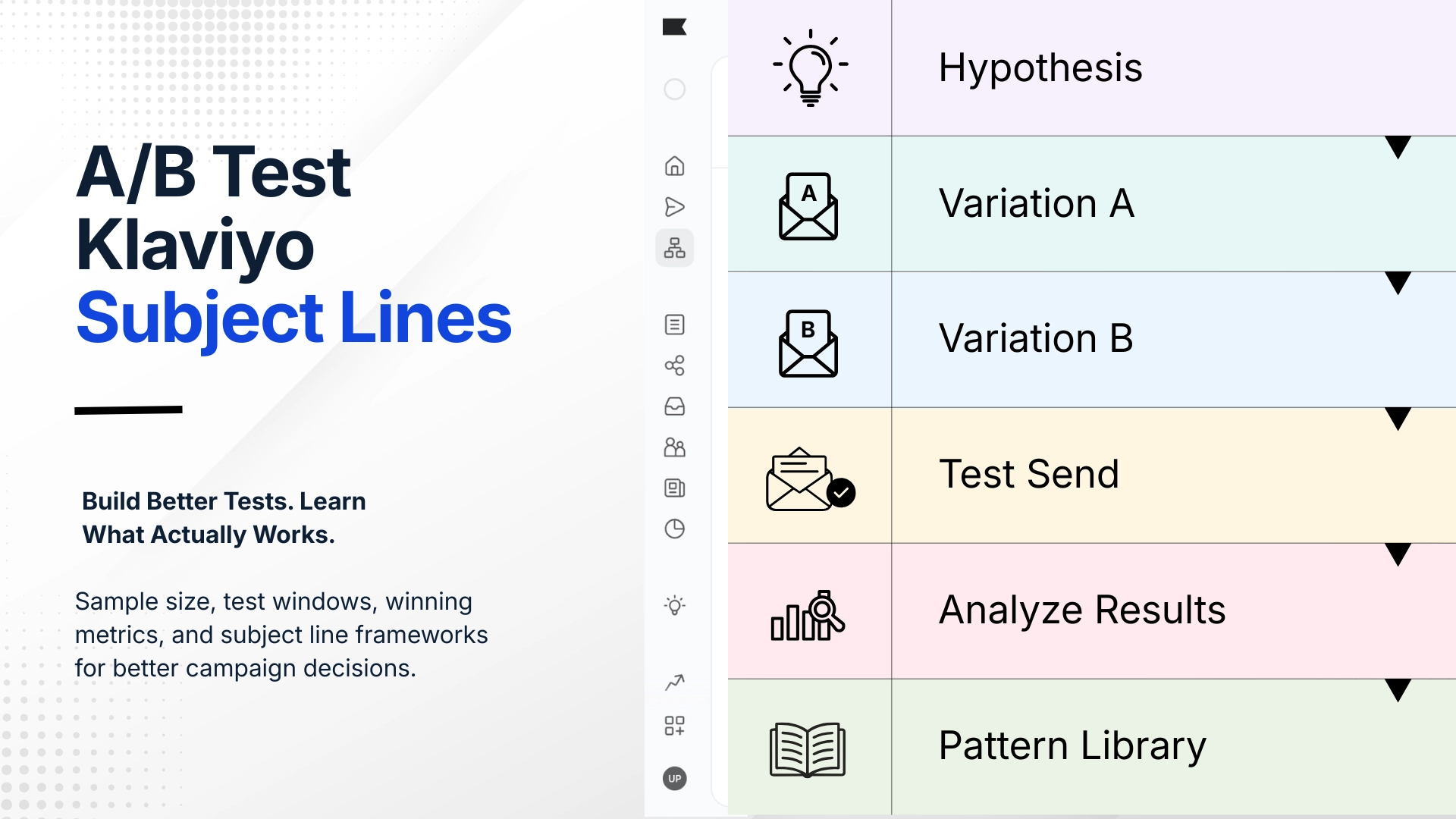
Subject Line Testing Framework
Before creating any test, define the variable.
| Question |
| Hypothesis |
| Variation A |
| Variation B |
| Send Test |
| Analyze Results |
| Record Pattern |
The final step is the most important.
The goal is not to find a winner. The goal is to build a repeatable understanding of what your audience responds to.
How Klaviyo’s A/B Testing Works
Klaviyo’s built-in A/B test for campaigns lets you test two variations of a subject line against a portion of your list, then automatically send the winning version to the remainder.
The basic mechanics:
- You define the test group size, for example 30% of the segment, split between variation A and variation B.
- Klaviyo sends both variations to the test group.
- After a defined time window, Klaviyo can send the winning variation to the remaining recipients.
- The winner is determined by the metric you select, such as open rate, click rate, or placed order rate.
This auto-send feature is convenient. It is also where many brands make their first mistake: letting the platform pick a winner based on open rate alone, within a time window that may be too short to produce reliable results.
The Core Problem: Testing Without a Hypothesis
The most common reason subject line tests produce nothing actionable is that there was no clear hypothesis before the test started.
Running “subject line A vs. subject line B” with no defined question produces a binary result: one won, one lost. But it does not explain why. If variation A was shorter, had an emoji, used first-person language, and included the product name, while variation B was longer, had no emoji, used second-person language, and referenced the product category, which variable caused the difference?
You do not know. And you cannot apply it cleanly to the next campaign.
A proper A/B test starts with a specific question:
- Does this list respond better to short subject lines under 40 characters or longer ones with more context?
- Does a direct benefit statement outperform a curiosity gap for this audience?
- Does adding the subscriber’s first name improve opens on this list?
- Does including a specific product name outperform a broader category reference?
One question, one variable. Everything else stays as close to identical as possible. That is the test.
If you cannot explain what the test is trying to learn before sending it, the result will be hard to use later.
What to Test: Variables Worth Isolating
Common subject line variables to isolate include:
| Variable | Variation A | Variation B |
|---|---|---|
| Length | Short | Long |
| Tone | Direct | Curiosity |
| Personalization | First name | No first name |
| Format | Question | Statement |
| Urgency | Deadline based | Non-urgent |
| Emoji usage | Emoji | No emoji |
Test only one variable at a time. Mixing variables makes the result impossible to interpret.
1. Subject Line Length
Short vs. long is one of the clearest variables to test because the difference is easy to control.
Short means under 40 characters. Long usually means 55 characters or more. Keep the core message, offer, product, and occasion the same across both versions. Change only the length and level of detail.
Example pair:
- Short: “Weekend sale starts now”
- Long: “Your weekend sale is live – 20% off sitewide through Sunday”
What you are testing: does more information in the subject line help or hurt open rates for this list?
2. Tone: Direct vs. Curiosity Gap
Direct subject lines state clearly what is inside. Curiosity gap subject lines withhold information to create a reason to open.
Example pair:
- Direct: “20% off ends Sunday – shop the sale”
- Curiosity: “Before you miss this one…”
Curiosity gaps can produce higher open rates. They can also produce lower click rates if the email content does not deliver on the implied promise. This is why tracking click rate alongside open rate matters.
Results vary by audience and brand. High-trust lists with loyal buyers often respond well to direct subject lines. Newer or colder lists may need more curiosity to earn the open.
3. Personalisation
Adding the subscriber’s first name to the subject line, such as “Sarah, your weekend offer is inside” vs. “Your weekend offer is inside”, remains useful for some audiences.
The honest picture in 2026: personalisation in subject lines can still work, but many subscribers are more familiar with automated name insertion than they used to be.
Worth testing if you have not tested it recently. Do not assume it works or does not work based on industry benchmarks. Test it against your specific list.
4. Question vs. Statement
Framing the subject line as a question can improve open rates when the question is relevant and specific to the subscriber’s situation.
Example pair:
- Statement: “Our most-reviewed product just restocked”
- Question: “Have you tried our most-reviewed product?”
Questions work best when they address a genuine consideration the subscriber is likely to have. Generic questions, such as “Ready to transform your routine?”, tend to perform poorly because they do not pass a basic relevance test.
5. Urgency Framing
Testing how urgency is communicated, or whether urgency is included at all, reveals a lot about a list’s relationship with promotional pressure.
Example pair:
- With urgency: “Last 48 hours – 20% off ends Monday”
- Without urgency: “20% off – our spring edit”
Some lists respond well to deadline framing. Others, especially loyal buyer lists, may show weaker engagement or higher unsubscribe risk when urgency language is used too often. Testing this helps you calibrate how much deadline framing is appropriate.
6. Emoji vs. No Emoji
This is a straightforward binary test that is worth running once and revisiting occasionally.
Example pair:
- With emoji: “🌿 New arrivals just landed”
- Without emoji: “New arrivals just landed”
Emoji impact varies by audience, inbox provider rendering, and how frequently your brand already uses them. The effect on your specific list is what matters.
Sample Size: Why Most Tests Are Inconclusive
This is the part of A/B testing that most guides underexplain.
For a subject line result to be meaningful, each variation needs enough recipients to reduce the chance that the winner is just random noise.
A rough working guideline: 1,000 recipients per variation is a useful practical minimum for ecommerce subject line tests where the expected open rate is around 30-40%. Below that threshold, a small difference in open rate can easily be noise rather than signal.
What this means practically:
- If your engaged segment is 3,000 subscribers, a 33%/33% split gives each variation roughly 1,000 recipients.
- If your engaged segment is 10,000 subscribers, a 20%/20% split gives each variation roughly 2,000 recipients while leaving 60% for the winner.
- If your engaged segment is under 2,000 subscribers, treat test results as directional rather than definitive.
Klaviyo has its own statistical significance guidance and may surface significance labels in campaign test results. Still, use judgment before acting on a small lift, especially when the sample size is limited or the difference is only a few percentage points.
Small lists can still test, but the result should guide future thinking rather than immediately become a permanent rule.
Choosing the Right Winning Metric
Klaviyo lets you set a winning metric such as open rate, click rate, or placed order rate. Open rate is common for subject line tests, but it is not the only number worth reviewing.
Open rate measures whether the subject line earned the open. It is the cleanest metric for isolating subject line performance.
Click rate measures whether the email content delivered on the subject line’s promise. A high open rate with a weak click rate can mean the subject line created curiosity but not qualified interest.
Placed order rate or revenue per recipient measures commercial impact. This matters, but it can be noisy during a short test window because purchases often happen after the initial open.
Recommended approach: use open rate as the primary subject line learning metric, then review click rate and revenue after the full campaign has had time to run.
Setting the Test Window
Klaviyo’s auto-send feature can send the winning variation to the remainder of the list after a time window you define.
For many ecommerce campaigns, very short windows are risky. Open data after only a few hours is incomplete because subscribers open emails throughout the day based on their inbox habits.
Recommended test window: 8-12 hours, or 24 hours if the campaign timing allows it. A longer window gives you more data before the winner is selected, especially for lists across multiple time zones.
If the campaign is time-sensitive, such as a same-day flash sale, a shorter window may be unavoidable. In that case, treat the result as directional rather than definitive.
How to Log and Build From Results
An individual test result is only useful in the moment. A pattern built from 10-15 tests is what improves long-term performance.
Keep a simple test log with these fields:
| Date | Campaign | Variable Tested | Variation A | Variation B | A Open Rate | B Open Rate | A Click Rate | B Click Rate | Winner | Notes |
|---|---|---|---|---|---|---|---|---|---|---|
| May 2026 | Spring sale | Length | Short (32 chars) | Long (58 chars) | 38% | 34% | 4.2% | 5.1% | A by open rate | B had higher CTR. Investigate. |
Over time, this log reveals patterns:
- Does short consistently outperform long, or does it depend on campaign type?
- Do curiosity gaps work better for product launches than for sale announcements?
- Has personalisation lift decreased over the past six months?
These patterns become the constraints you feed into your subject line writing process. The test log turns individual experiments into compounding knowledge.
Common A/B Testing Mistakes to Avoid
Testing too many variables at once. If variation A is shorter, has an emoji, and uses a curiosity gap while variation B is longer, has no emoji, and is direct, you cannot attribute the result to any single factor.
Declaring winners from undersized tests. A small open-rate difference on a small sample is not a reliable conclusion. Treat it as a weak directional signal.
Only testing during sale periods. Promotional campaigns can generate higher engagement across the board, which can skew results. Test during regular campaign sends too.
Not tracking beyond open rate. A subject line that inflates opens but suppresses clicks or purchases is not necessarily better. Always review click rate after the test window closes.
Abandoning tests that produce no clear difference. A null result is still useful. It tells you that the variable may not meaningfully affect this list.
Retesting the same variable too quickly. Space variable tests out and move to new questions once you have a reliable answer.
Tools I Use For Subject Line Testing
Klaviyo
Used for:
- Campaign split testing
- Open rate analysis
- Click rate analysis
- Revenue tracking
Google Sheets
Used for:
- Test logs
- Pattern tracking
- Historical comparison
ChatGPT
Used for:
- Subject line ideation
- Test variation generation
Claude
Used for:
- Campaign planning
- Test documentation
The testing framework matters more than the tool.
FAQs
How do I set up an A/B test in Klaviyo?
When creating a campaign, Klaviyo offers an A/B testing option in the campaign setup flow. You create variations, choose what you are testing, select the winning metric, and define the test settings. Klaviyo handles the send split and winner selection based on your setup.
How many subscribers do I need to run a valid A/B test?
A practical minimum is roughly 1,000 recipients per variation if you want to act on the result with confidence. Smaller lists can still test, but the results should be treated as directional.
Should I test subject line or preview text?
Test them separately. Subject line and preview text work together, but testing both at once makes attribution difficult. Start with subject line, establish patterns, then test preview text variations against a fixed subject line.
What is the best time window for a Klaviyo A/B test?
8-12 hours is a reasonable default for many ecommerce lists. For time-sensitive campaigns, 4-6 hours may be unavoidable. For non-time-sensitive campaigns, 24 hours gives more complete data.
Does Klaviyo tell me if my A/B test result is statistically significant?
Klaviyo provides statistical significance guidance for campaign A/B tests and may classify results based on win probability and recipient volume. Even then, use judgment before turning a small result into a permanent rule.
How often should I A/B test subject lines?
Test when the list size and campaign timing allow it. What matters more than frequency is consistency: testing regularly, isolating one variable, and logging the result.
Can I A/B test flows in Klaviyo?
Yes. Klaviyo supports A/B testing for flow emails too. Flow tests usually need longer timeframes because subscribers enter flows over time instead of receiving one campaign send at once.
Related Email Marketing Guides
Use these supporting guides to connect subject line testing with the rest of your Klaviyo email marketing system:
- How to Improve Klaviyo Welcome Flow Performance
- Klaviyo Segmentation Mistakes That Hurt Open Rates
- How I Create Klaviyo Email Drafts Faster
- Ecommerce Email Marketing Strategy Guide
Key Takeaways
- Start with a hypothesis. Define what variable you are testing before setting up the test.
- One variable per test. Isolate length, tone, personalisation, urgency, or emoji use separately.
- Use enough recipients. Around 1,000 per variation is a useful practical threshold for stronger directional confidence.
- Track click rate alongside open rate. Opens alone do not tell the full story.
- Use a realistic test window. 8-12 hours is usually more useful than a very short test window.
- Log every test result. Patterns across multiple tests are more useful than one-off winners.
- Results vary by list, send frequency, and audience. Benchmarks from other brands are starting points, not targets.
Free Subject Line Testing Checklist
Before every A/B test:
- Define a single hypothesis
- Isolate one variable
- Verify sample size
- Set the test window
- Select the winning metric
- Track click rate
- Record the result
- Update the testing log
Most testing mistakes happen before the email is sent. A simple checklist prevents expensive assumptions.
Conclusion
Subject line A/B testing is worth doing. Most brands either do not do it at all, or do it in a way that produces results too noisy to learn from.
The discipline is in the setup: one variable, sufficient sample size, the right test window, and a log that captures results over time. Without that structure, you end up with a collection of individual data points that do not compound into anything useful.
Built correctly, a subject line test log becomes one of the most useful documents in your email marketing system. After enough tests, you have a working model of your audience: what length they prefer, how they respond to urgency, whether personalisation moves the number, and what framing works for product launches versus sale announcements.
Something to implement on your next campaign if your current testing is ad hoc or result-free.
Last updated: May 2026. Platform features referenced are based on Klaviyo’s current interface. Verify specific settings against Klaviyo’s documentation.

Related guides

Best Email Marketing Software for Contractors (2026)
A practical comparison of Mailchimp, Constant Contact, Brevo, MailerLite, Kit, and field service marketing tools for contractors.
Best Email Marketing Software for Hair Salons & Spas (2026)
A practical comparison of Mailchimp, Constant Contact, Brevo, MailerLite, Kit, and booking-software marketing tools for salons and spas.
Best Email Marketing Software for Restaurants (2026)
A practical comparison of Mailchimp, Constant Contact, Brevo, MailerLite, Kit, and Toast Marketing for restaurant email marketing.