Zoho CRM Review (2026): Is It Worth It for Small Businesses?
AT A GLANCE
A practical CRM to evaluate for an active sales pipeline, with clear INR pricing; choose the edition carefully because AI and email features vary by plan.
Zoho CRM is designed for businesses that need to track leads, deals, activities and follow-ups in one place. For an Indian small business, its appeal is clear: it offers local rupee pricing, a free plan for small teams, and paid editions that add deeper automation, reporting and AI features as the sales process grows.
This review combines a hands-on look at the supplied Deals Pipeline screen with current information checked against Zoho’s official India edition comparison on 27 May 2026. Features and prices can change, so confirm the live plan details before subscribing.
Quick answer: is Zoho CRM worth considering?
- Worth considering for small businesses with an active sales pipeline and multiple follow-ups to manage.
- Strong practical point: the stage-based Deals view makes opportunity value and next actions easy to scan.
- Low-risk start: Zoho lists a free edition for up to three users.
- Important limitation: advanced capabilities are plan-specific; SalesInbox is listed for Enterprise and Ultimate, while Zia capabilities vary by edition.
Deals Pipeline: the clearest reason to use a CRM
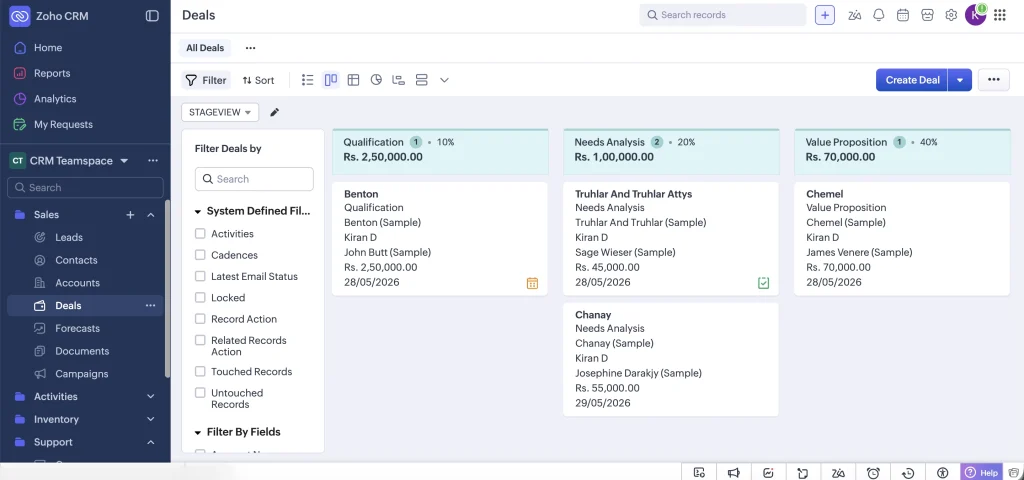
The supplied Zoho CRM screen shows the Deals module in stage view, with opportunities grouped into columns such as Qualification, Needs Analysis and Value Proposition. Each card shows essential context including the account or contact, owner, amount and expected close date.
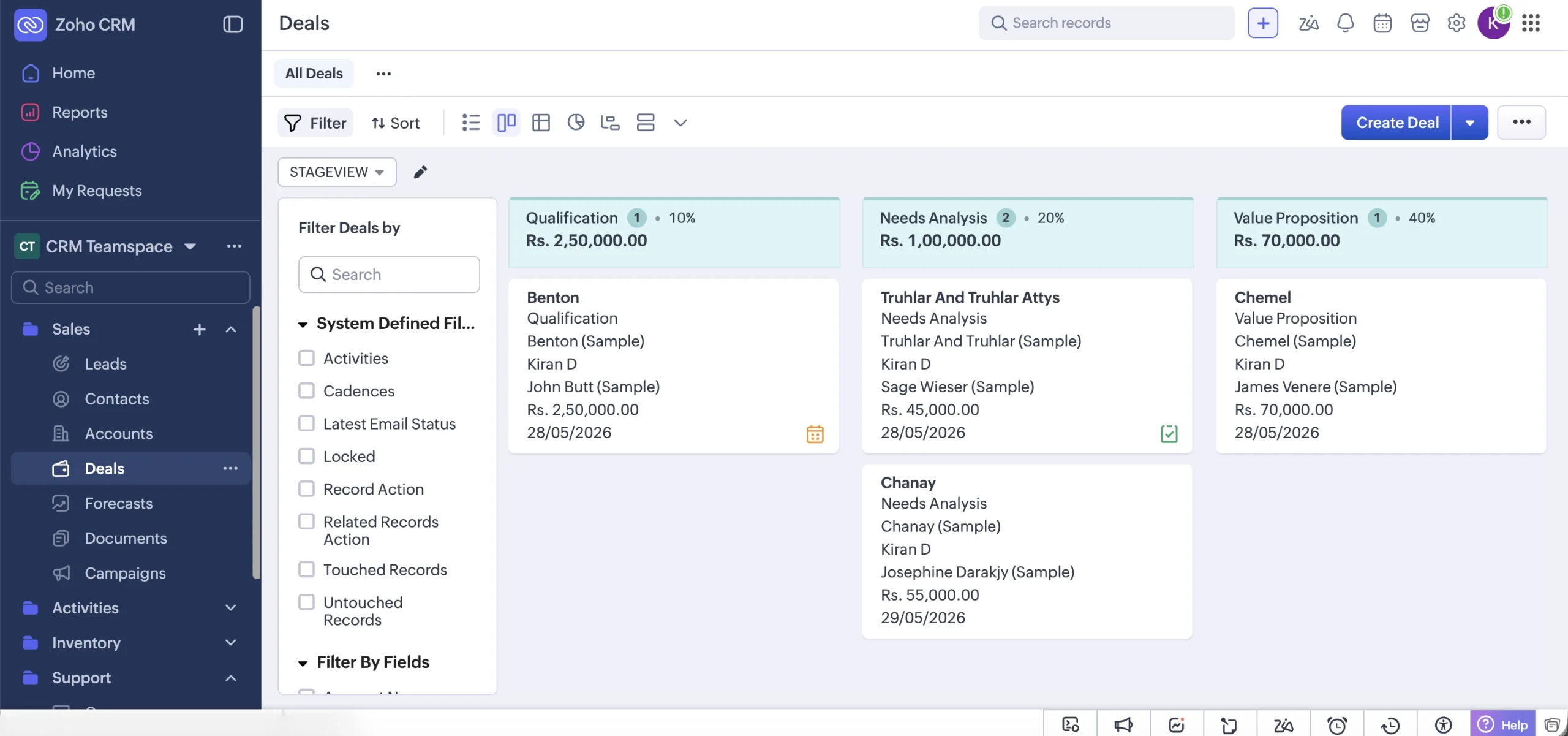
This is useful because a small team can immediately see where current value sits in the sales process. In the supplied sample-data view, the stages display rupee-denominated pipeline totals and individual opportunities, which makes the interface relevant for an India-based setup without relying on a spreadsheet.
The screen also shows filtering and alternate view controls. That matters once a pipeline becomes crowded: a business can narrow deals by fields or activity status instead of losing follow-ups in a long list.
Zoho CRM India pricing and free plan
Zoho’s official CRM edition comparison page lists the following India pricing, with local taxes charged in addition to the displayed amounts:
| Edition | Billed annually | Billed monthly |
|---|---|---|
| Free | Free for 3 users | Free for 3 users |
| Standard | ₹800/user/month | ₹1,300/user/month |
| Professional | ₹1,400/user/month | ₹2,100/user/month |
| Enterprise | ₹2,400/user/month | ₹3,000/user/month |
| Ultimate | ₹2,600/user/month | ₹3,200/user/month |
Practical buying note: The free edition is a reasonable place to learn the basic record structure if you have up to three users. A paid plan becomes more relevant when the team needs richer dashboards, sales forecasting, email features or particular Zia capabilities.
Core sales and activity features
Zoho’s official feature table includes Leads, Accounts, Contacts, Deals and Activities (tasks, meetings and calls) across the listed editions, including Free. That core set is enough to establish a basic sales-tracking workflow.
Sales forecasting is listed from Standard upward. Standard dashboards, charts and KPIs are also listed from Standard upward, while the Free edition has more limited analytics. This distinction matters: a free CRM can record activity, but a team wanting management visibility will need to compare paid-plan features carefully.
Zia AI: useful, but plan availability matters
Zia is Zoho CRM’s AI functionality, but it should not be described as a single feature available identically on every paid plan. Zoho’s official comparison table lists separate Zia capabilities with different edition availability. For example, the table marks Ask Zia as unavailable on Free and Standard and available from Professional upward, while other prediction, recommendation and analytics functions vary by plan.
That means a small business choosing Zoho specifically for AI should first list the Zia functions it needs, then check the corresponding edition rather than assuming the least expensive paid tier includes them all.
SalesInbox and email workflow
SalesInbox is designed to organize emails using CRM context, such as deals, leads and contacts, so sales-related messages are easier to prioritize. This can be useful when email follow-up is a major part of the sales process.
However, Zoho’s official availability table lists SalesInbox for the Enterprise and Ultimate editions, not for Free, Standard or Professional. Zoho’s help documentation also states that the email account must be configured before SalesInbox appears for use. For a small team, this is an important cost and setup consideration.
What Zoho CRM does well, and where to be careful
What stands out
- The Deals stage view is clear and commercially useful for monitoring active opportunities.
- Indian rupee pricing is publicly listed, avoiding exchange-rate uncertainty when comparing plans.
- A free edition for up to three users gives very small teams a practical starting point.
- Core lead, contact, account, deal and activity tracking is included across editions.
What to consider before upgrading
- The interface offers many modules and controls, which may be more than a solo operator needs.
- AI, advanced reporting, forecasting and email workflow capabilities are not identical across plans.
- SalesInbox requires an Enterprise or Ultimate plan according to the current edition comparison.
- A CRM is only useful when records and follow-up stages are kept up to date by the team.
Who is Zoho CRM best for?
Zoho CRM is a sensible fit to evaluate for a small or mid-size business that has recurring leads, several open opportunities, and a need for consistent follow-up. It is particularly relevant when a team wants to see pipeline amounts, deal stages and activities together rather than maintaining separate sheets.
It may be more than necessary for a solo business that only stores a few contacts and does not run a structured sales pipeline. In that case, start on the free edition and decide whether the deal workflow saves enough time to justify paid features.
FAQs
Is Zoho CRM free in India?
Zoho’s official India edition table lists a Free edition for up to three users. It includes core CRM records such as leads, contacts, accounts, deals and activities, but many enhanced features are available only on paid editions.
How much does Zoho CRM cost in India?
When checked on 27 May 2026, annual billing was listed from ₹800/user/month for Standard, ₹1,400 for Professional, ₹2,400 for Enterprise and ₹2,600 for Ultimate. Monthly billing was listed at higher per-user prices. Zoho states that local taxes are added.
Does Zoho CRM include Zia AI?
Zoho CRM includes Zia capabilities on selected editions, but availability depends on the specific function and plan. For example, the official comparison table lists Ask Zia from Professional upward, not on Free or Standard.
Does Zoho CRM include SalesInbox?
SalesInbox is listed for Enterprise and Ultimate editions in Zoho’s current feature availability table, and email configuration is required before use.
Is Zoho CRM good for a small business?
It can be a good fit for a small business with an active lead and deal process. The free edition makes initial evaluation practical, but the right paid tier depends on which reporting, email and AI functions the business will actually use.
Final verdict
Zoho CRM is worth evaluating for Indian small businesses that want a structured pipeline without starting at a high subscription cost. The Deals Pipeline view is easy to understand, and the free-for-three-users option gives a small team a practical way to learn whether CRM discipline improves its follow-up process.
The main caution is plan selection. Do not assume a feature mentioned in Zoho CRM marketing is included in every edition: Zia functions vary, and SalesInbox currently sits in the Enterprise and Ultimate tiers. Begin with the simplest plan that supports the workflow you genuinely need, then upgrade only when the missing feature has clear value.
Official sources checked
- Zoho CRM edition feature comparison – India prices, free-plan limit and feature availability.
- Zoho SalesInbox overview – describes the email and CRM workflow.
- Zoho SalesInbox help documentation – edition and setup requirements.
Last reviewed: 27 May 2026. Pricing and feature availability may change; check Zoho’s official pages before choosing a plan.